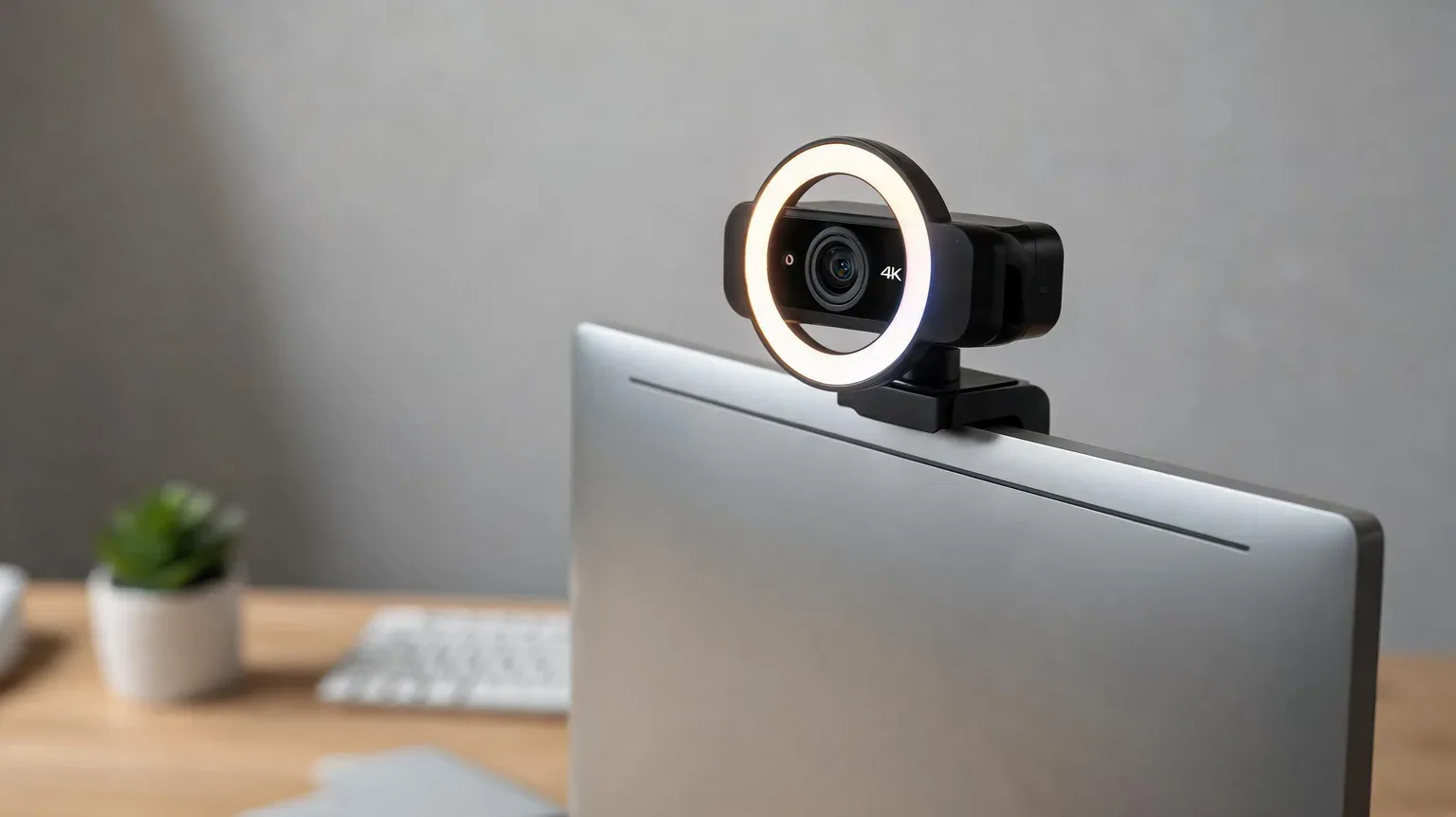
The best webcams with ring light solve a problem a tripod lamp cannot: they put the light exactly where the camera is looking, so your face is lit instead of your wall. We compared seven live Amazon listings — five with a built-in ring light and two deliberately without one — on sensor size, light control, autofocus type, field of view and what actually arrives in the box, then checked every number against the listing itself and against published lab testing.
Affiliate disclosure: As an Amazon Associate I earn from qualifying purchases. We earn commission from qualifying purchases made through links on this page. This never affects our rankings or what we recommend.
Contents
- Our picks at a glance
- Spec-truth table: what the listings actually say
- 1. NexiGo N680E Pro 4K — best overall
- 2. NexiGo N960E Plus 4K — best ring light with a remote
- 3. EMEET S600L 4K — best value 4K
- 4. Angetube 4K (967 Ultra) — best mid-range
- 5. papalook PA552 — best budget ring light
- 6. Logitech C920s HD Pro — best image quality without a light
- 7. NexiGo N60 — best budget and biggest install base
- Where paying more stops buying performance
- Where we disagree with Tom’s Hardware, PCMag and ZDNET
- Why ring-light webcams still disappoint
- Spec claims, checked
- How to choose a webcam for video calls
- How to measure your desk for a webcam
- Frequently asked questions
- Sources & further reading
How we researched this guide
Every price, stock status, rating pool, sensor size and field of view in this guide was pulled from the live Amazon listing for that exact ASIN on September 23, 2026, and the hardware claims were then checked against published independent testing from Tom’s Hardware, PCMag and ZDNET, and against the American Academy of Ophthalmology’s guidance on screen brightness and glare.
Our full process — including what we do and do not claim — is set out on our how we test and choose products page.
Sourcing transparency: nothing in this guide was lab-tested by us. We did not measure light output in lux, time the autofocus with instruments, or run noise-floor recordings. What we did was verify each listing’s own numbers, compare them against published tester results, and say plainly where the two disagree. Where a manufacturer publishes no figure for a spec, the table below says so rather than guessing.
Our picks at a glance
Five ring-light cameras and two deliberately light-free picks, ordered by what they are best at. Every price and stock line below was pulled from the live listing on September 23, 2026.
| Product | Standout spec | Price | Track record | Deal |
|---|---|---|---|---|
 NexiGo NexiGo N680E Pro 4K Webcam with Ring Light, PDAF Autofocus, 1080p 60FPS, Dual |
【Unmatched 4K Streaming Quality】The NexiGo N680E Pro has a Sony 1/2.5" 4K sensor for ultra-shar | $99.99 |
#32 in Webcams |
In Stock |
 NexiGo NexiGo N960E Plus 4K Webcam with Ring Light & RF Remote, ToF Autofocus, OSD Me |
【Ultra HD 4K & Fluid 60 fps Streaming】Equipped with a 1/2.5" CMOS sensor, the N960E Plus captur | $89.99 $99.99 |
#74 in Webcams |
10% OFF In Stock |
 EMEET EMEET S600L 4K Webcam for Streaming with Ring Light, 1/2" Sensor, 0.2S PDAF |
Advanced Imaging & Ring Light System – S600L is a 4K Webcam for streaming with ring light that | $59.99 $79.99 |
#13 in Webcams |
25% OFF Prime Exclusive In Stock |
 Angetube Angetube 4K Webcam with Ring Light, Computer Web Camera for Desktop, Laptop |
【Webcam 4K UHD】This Angetube 967 Ultra 4K webcam for pc supports resolutions from 4K@30FPS to 1 | $44.97 $49.99 |
#72 in Webcams |
10% OFF In Stock |
 papalook papalook 2K Webcam with Light and Privacy Cover, PA552 Full HD Streaming Web C |
3-Level Adjustable Touch Ring Fill Light: This computer webcam has a built-in light ring that o | $16.14 $16.99 |
#166 in Webcams |
5% OFF Prime Exclusive In Stock |
 Logitech Logitech C920S HD Pro Webcam Full 1080p/30fps Video Calling Clear Stereo |
Webcam comes with privacy shutter – puts you in control of what you show and protects the lens | $67.16 |
#11 in Webcams |
In Stock |
 NexiGo NexiGo N60 1080P Webcam with Microphone, Software Control & Privacy Cover, USB |
【Full HD 1080P Webcam】Powered by a 1080p FHD two-MP CMOS, the NexiGo N60 Webcam produces except | $27.99 $39.99 |
#4 in Webcams |
30% OFF In Stock |
Spec-truth table: what the listings actually say
Most ring-light webcam roundups repeat the same short spec sheet. This one is built row by row from the seven listings themselves, which is why three cells say “not published”: Angetube and NexiGo do not state a sensor size or field of view for some models, and inventing one would be the easiest way to make this table look tidier and less true.
| Product | Sensor (as listed) | Max output | Autofocus | Built-in light | FOV | Privacy | Price |
|---|---|---|---|---|---|---|---|
| NexiGo N680E Pro 4K | Sony 1/2.5″ 4K CMOS | 4K30 / 1080p60 | PDAF | 3 modes + stepless dial | 80° | Yes (shutter) | $99.99 |
| NexiGo N960E Plus 4K | 1/2.5″ CMOS | 4K30 / 1080p60 | ToF | 3 modes + stepless, remote | Not published | Yes (cover) | $89.99 |
| EMEET S600L 4K | 1/2.0″ Samsung | 4K30 / 1080p60 | PDAF (0.2 s) | 4 modes + dial | 73° | Yes (cover) | $59.99 |
| Angetube 4K (967 Ultra) | Not published | 4K30 / 1080p60 | PDAF | 3 fixed levels | Not published | Yes (shutter) | $44.97 |
| papalook PA552 | 2 MP CMOS | 1080p30 | Fixed | 3 fixed levels (touch) | 75° | Removable cover | $16.14 |
| Logitech C920s HD Pro | Glass lens, light correction | 1080p30 | HD autofocus | None | ~78° | Yes (shutter) | $67.16 |
| NexiGo N60 | 2 MP CMOS | 1080p30 | Fixed (19.6 in–13 ft) | None (indicator only) | Not published | Yes (cover) | $27.99 |
Built from the live Amazon listings on September 23, 2026. “Not published” means the listing does not state the figure — it is not an estimate.
Two things stand out. First, four of the seven cameras can output 4K, but only one of them (the EMEET S600L) publishes the sensor size that determines how good that 4K actually looks in a dim room. Second, the two cheapest cameras have no fill light at all, which matters more than resolution on a 1080p call.
The 7 best webcams with ring light in 2026
Five of the seven cameras below have a built-in ring light listed in the product title and feature bullets. Two — the Logitech C920s and the NexiGo N60 — have none, and we have said so in the heading rather than quietly counting them. They are here because buyers ask for them by name, and because both are honest answers for people who already own lighting.
1. NexiGo N680E Pro 4K — Best overall
What we like
- A true 4K Sony 1/2.5-inch sensor, and it still streams a clean 1080p at 60 fps
- Tri-tone ring light: three colour temperatures by touch plus stepless brightness on a rotating dial
- PDAF autofocus holds focus while you move, instead of hunting
- Built-in privacy shutter, so the lens is blocked without a separate cover
- 1/4-inch tripod thread and an 80-degree field of view
Flaws but not dealbreakers
- 4K output depends on your app – Zoom and Teams will still send 1080p
- USB-A plug-and-play only; Switch 2 owners need their own USB-C to USB-A adapter
- Premium price for a ring-light webcam
Best for: People who want the best ring-light picture and will not trade down on the sensor.
Who should skip it: Skip it if you only ever use Zoom and Teams, which cap out at 1080p – a cheaper 1080p pick looks nearly identical on a call.
2. NexiGo N960E Plus 4K — Best ring light with a remote
What we like
- Shipped RF remote controls 4x digital zoom, presets, the on-screen menu and the ring light
- ToF (time-of-flight) autofocus locks on in a fraction of a second with no focus hunting
- Settings survive unplugging – built-in flash memory stores your presets
- Tri-tone ring light with three colour modes and stepless brightness
- 360-degree rotation and 45-degree tilt on the clip, plus a 1/4-inch tripod thread
Flaws but not dealbreakers
- White colourway only – the one thing you cannot choose
- 4x zoom is digital, not optical, so cropping costs you detail
- Cosmetics and remote are the premium over the N680E Pro; the sensor is the smaller 1/2.5-inch unit
Best for: Streamers and presenters who adjust framing and light mid-session without leaving their seat.
Who should skip it: Skip it if you sit still in one fixed frame – the remote and the zoom are what you are paying for.
3. EMEET S600L 4K — Best value 4K
What we like
- The largest sensor here after the N680E Pro – a 1/2.0-inch Samsung unit, which is why the low-light video holds up
- PDAF autofocus rated to lock in 0.2 seconds from 10 cm out to infinity
- Four ring-light modes (cool white, warm white, natural white and ambient) adjustable on a physical dial
- Shoots landscape or portrait, so it works for vertical video as well as calls
- 360-degree rotation with plus/minus 15-degree tilt and a 1/4-inch mount
Flaws but not dealbreakers
- USB 2.0 connection, not USB 3.0 – fine for 4K30, but it is the older link
- The 1/2.0-inch sensor and the 25% discount are why it is the value pick, not the outright best
- Rating pool is the smallest of the four 4K picks here, so treat the score as early
Best for: Buying 4K with a real light on a mid-range budget.
Who should skip it: Skip it if you want USB 3.0 or the deepest review history – pay a little more for the NexiGo pair.
4. Angetube 4K (967 Ultra) — Best mid-range
What we like
- 4K at 30 fps and 1080p at 60 fps with PDAF autofocus
- Three-level touch ring light that evens out shadows without a separate lamp
- Privacy shutter plus dual microphones
- The deepest review pool of any 4K pick here
- USB-A with an adapter for USB-C ports in the box
Flaws but not dealbreakers
- The ring light has three fixed brightness steps and no colour-temperature control
- Sensor size and field of view are not published on the listing, so you cannot compare them numerically
- 4K30, not 4K60 – nothing here shoots 4K above 30 fps
Best for: Getting 4K and a built-in light without crossing $50.
Who should skip it: Skip it if you need warm or cool colour control on the light, or you want the sensor documented before you buy.
5. papalook PA552 — Best budget ring light
What we like
- A touch-controlled three-level ring light for under $20
- 75-degree lens keeps background clutter out of frame – useful in a shared room
- Dual omnidirectional microphones with noise reduction, rated to pick up voice at 5-10 metres
- Privacy cover included and removable
Flaws but not dealbreakers
- The title says 2K, but the listing’s own spec bullet says 1920 x 1080 at 30 fps – budget for 1080p, not 1440p
- Fixed focus: it will not refocus if you lean in or hold something up to the lens
- Narrow 75-degree field of view is a poor fit for two people at one desk
Best for: A first ring-light webcam on a tight budget, or a spare for a second desk.
Who should skip it: Skip it if you move around, present objects to camera, or need a wide shot – fixed focus and 75 degrees will fight you.
6. Logitech C920s HD Pro — Best image quality without a ring light
What we like
- The reference 1080p webcam: glass lens, HD autofocus and automatic light correction
- Stereo audio from dual microphones
- Privacy shutter included
- Ten years of install base, so driver and app support is mature
Flaws but not dealbreakers
- No built-in light at all – this is the pick for people who already own lighting
- Released February 2020 and still $67, which is more than two of the 4K picks here
- 1080p30 only, no 60 fps mode
Best for: Anyone who already has good room light and wants the most predictable 1080p image.
Who should skip it: Skip it if the room you take calls in is dim – with no light of its own, this camera shows exactly how dark the room is.
7. NexiGo N60 — Best budget and the biggest install base
What we like
- The most-reviewed webcam in this guide by a wide margin, and the cheapest of the seven
- Fixed focus tuned for 19.6 inches to 13 feet, which covers normal desk sitting
- Noise-cancelling microphone and a privacy cover
- Works with USB 2.0 or 3.0 with no drivers
Flaws but not dealbreakers
- No fill light – the LED is an indicator, not a lamp, so this is only a ring-light pick in the sense that it replaces one
- Fixed focus means no refocusing if you move closer
- The listing itself points owners to a firmware update if they notice audio delay
Best for: A reliable, cheap plug-and-play camera for calls where lighting is already fine.
Who should skip it: Skip it if your desk is dark, because nothing on this camera will brighten you.
Where paying more stops buying performance
The ring-light webcam market has four price bands, and the useful part of each band is narrow. Here is what actually changes as you move up, and where the money stops buying you a better video call.
- Under $20 (papalook PA552, $16.14). You get a 1080p fixed-focus sensor and a three-level touch ring light. This is genuinely enough to look presentable on Zoom. You do not get autofocus, a wide field of view, or any published sensor size.
- $25–$45 (NexiGo N60 $27.99, Angetube 4K $44.97). Two different bets. The N60 buys you the largest install base of any camera here and no light; the Angetube buys you 4K and a three-level light but publishes neither sensor size nor field of view.
- $55–$70 (EMEET S600L $59.99, Logitech C920s $67.16). This is the band where the sensor starts being documented. The S600L tells you it is a 1/2.0-inch Samsung unit with a 0.2-second PDAF lock; the C920s trades all of that for a decade of driver maturity and no light at all.
- Above $85 (NexiGo N960E Plus $89.99, N680E Pro $99.99). You are buying the light and the control surface, not resolution — every camera in this band tops out at 4K30, exactly like the $44.97 Angetube.
The stopping point is $60. Above it, the extra money buys autofocus quality, a bigger sensor and finer light control — real improvements, but improvements a video call cannot display. Zoom, Teams and Google Meet compress everything to 720p or 1080p, and Tom’s Hardware’s webcam testing notes the same ceiling: most conferencing apps cap your outgoing resolution at 1080p or 720p. If calls are all you do, the “best” pick here is the EMEET S600L or the papalook PA552, and the $99.99 N680E Pro is money spent on a live-streaming problem you do not have.
If you stream or record locally, that calculus flips: the N680E Pro’s Sony 1/2.5-inch sensor and the S600L’s 1/2.0-inch sensor are the two that hold up when the room goes dark.
Where we disagree with Tom’s Hardware, PCMag and ZDNET
All three of the independent testers we cite crown a webcam with no built-in light at all. That is not a disagreement about quality — it is a disagreement about what the question is.
- Tom’s Hardware names the Logitech Brio 500 (about $130, 1080p30) its best overall, praising its auto-white balance and exposure handling and noting that it has the same surface-level specs as the older C920s and C930e but produces much better images. We agree on the image analysis and rank differently anyway: the Brio 500 has no built-in light, so it cannot be the best answer on a page about ring-light webcams.
- PCMag names the Obsbot Tiny 3 its best overall and rates the Logitech StreamCam its best 1080p pick. Both are strong cameras with AI tracking; neither has a built-in ring light. PCMag tests in its own PC Labs, and its focus is tracking, not lighting.
- ZDNET leads with the Insta360 Link, a $299 4K camera on a three-axis gimbal, and rates the Logitech Brio Ultra HD Pro its most feature-rich option. ZDNET’s own coverage notes the tension in this category: Razer’s 1080p Kiyo Pro was criticised for holding the same resolution as its predecessor while costing more, and Tom’s Hardware records that the Kiyo Pro dropped the built-in ring light that the original Razer Kiyo had.
Our ranking starts from the light, because that is the job this page was written to do. Rank on lighting plus verified live specs and the N680E Pro, the N960E Plus and the S600L separate from the AI-tracking field at less than a third of the price. If you want the best camera regardless of lighting, the Brio 500 and the Tiny 3 are excellent — buy one of those and a separate light, and you will have spent more than the N680E Pro.
Why ring-light webcams still disappoint
Complaint patterns in this category are consistent, and four of them are visible in the listings themselves rather than in review counts (we do not publish review-frequency percentages we cannot verify).
- The light is weaker than the marketing photo. A ring light around a lens is a few centimetres across. It is fill light, and the American Academy of Ophthalmology’s guidance on digital eye strain points the opposite way from the sales copy: brightness should be adjusted to match the light already in the room, because a screen — or a webcam light — that is brighter than its surroundings is what makes your eyes work harder.
- 4K that never leaves the camera. NexiGo’s own N680E Pro bullet warns that output resolution depends on the camera software you use. Conferencing apps cap at 1080p or 720p, so on a Teams call a 4K webcam and a 1080p webcam are sending the same picture.
- Fixed focus at the cheap end. The papalook PA552 and NexiGo N60 are both fixed-focus cameras, and both listings say so. That is fine if you sit still and fatal if you lean in to show a document, because neither can refocus.
- Rated specs that never appear. The papalook PA552 is sold as a “2K” webcam; its own spec bullet says 1920 x 1080 at 30 fps. Angetube does not publish the 967 Ultra’s sensor size or field of view. When a listing is quiet about a number, that is information.
- Colour and brightness control that is not there. Three of the seven lights here have three fixed brightness steps and no colour-temperature adjustment. If your office changes from daylight to a warm bulb in the evening, those picks cannot follow it.
Spec claims, checked
“2K” on the papalook PA552. The product title says 2K. The fourth feature bullet on the same page says “1080p Full HD, up to high definition 1920 x 1080p resolution at 30fps”. The pixel count is 1080p. Buy it as a 1080p camera with a light, which is what it is, and it is a bargain; buy it expecting 1440p and you will be disappointed.
“4K” on every 4K pick here. All four advertise 4K at 30 fps, which is accurate as a sensor output. It is not what leaves your computer: Zoom, Teams and Google Meet compress to 720p or 1080p. The 4K is real for local recording, OBS and editing; it is close to invisible on a call.
“Ring light as your only light source”. This is the claim worth checking against an institutional standard, and the American Academy of Ophthalmology’s digital-eye-strain guidance is the test. Its advice runs the other way: match screen brightness to the room, reduce glare, sit about 25 inches from the screen and angle your gaze slightly downward. A ring light bolted to a webcam is a shadow-filler, not a replacement for room lighting — use it at a low setting as fill and keep a window or a lamp in front of you.
“Plug and play, no drivers”. Several listings repeat this and it is broadly true for modern USB cameras, which present themselves as standard UVC (USB Video Class) devices that Windows, macOS and Linux already understand. Treat it as the default, not a guarantee: vendor features such as EMEET STUDIO presets or Logitech’s Logi Options+ still need software, and a few cameras ship firmware quirks — the NexiGo N60 listing itself tells owners to contact support for a firmware update if audio delay appears.
How to choose a webcam for video calls
Resolution: 1080p is the practical ceiling for calls
Buy 1080p with confidence for Zoom, Teams and Meet; all three compress to 720p or 1080p. Buy 4K only if you record locally, stream through OBS, or crop into the frame. A good 1080p camera with a fill light beats a cheap 4K camera in a dark room, which is the single most useful rule in this guide.
Sensor size beats megapixels
The two cameras here that publish their sensor size — the NexiGo N680E Pro at 1/2.5 inch and the EMEET S600L at 1/2.0 inch — are also the two with the best low-light claims. A larger sensor collects more light, which is why a 4K badge on a small sensor costs you noise in a dim room rather than buying you detail. Tom’s Hardware makes the same point from the other direction: higher resolution does not automatically mean better picture quality.
Ring light position, colour and brightness control
A true ring light surrounds the lens, which is why it flattens shadows instead of throwing them sideways. Look for stepless brightness rather than three fixed steps, and colour temperature control if you record in more than one room. Three of the seven lights here cannot change colour at all.
Autofocus: PDAF, ToF or fixed
Fixed focus is fine for a stationary caller and hopeless if you present objects. PDAF (phase-detection) and ToF (time-of-flight) both refocus quickly, and the listing will say which one it uses. Do not assume a camera has autofocus because it is expensive — the C920s does, the N60 does not.
Field of view: wide is not automatically better
60–78 degrees is the standard head-and-shoulders framing. 90 degrees and up fits two people or a room, but it also shows the laundry behind you and stretches faces at the edges. The papalook PA552’s narrow 75 degrees is presented as a privacy feature, and for a shared office it genuinely is.
Webcam or laptop camera?
A laptop’s built-in camera is usually a small sensor behind a small lens with no light. Any of the seven cameras here will beat it on a call, but the gain is largest in a dim room and smallest in a bright one — another reason to fix lighting before you fix resolution.
How to measure your desk for a webcam
Three measurements decide which of these cameras actually fits, and they take two minutes with a tape.
- Distance from the lens to your face. The American Academy of Ophthalmology recommends sitting about 25 inches (arm’s length) from a screen, with your gaze angled slightly downward. At 25 inches a 60–78 degree lens frames your head and shoulders; a 90-degree lens will also frame the room.
- Mount thickness. Every camera here clips to a monitor, and all but the C920s also carry a 1/4-inch tripod thread. If your monitor has a thick bezel or a soundbar, check the clip before you buy.
- Height. A webcam at eye level needs no tilt correction. Sitting below a tall monitor, you will want a camera that tilts well — the N960E Plus tilts 45 degrees and the S600L plus/minus 15 degrees.
Frequently asked questions
Do I need a 4K webcam for Zoom calls?
No. Zoom, Teams and Google Meet compress outgoing video to 720p or 1080p. A good 1080p camera with a fill light looks better than a cheap 4K camera in a dark room. 4K earns its money when you record or stream locally.
Can I use a webcam ring light as my only light source?
It helps, but it is fill light, not a replacement for the room. The American Academy of Ophthalmology’s guidance on digital eye strain is to match screen brightness to your surroundings and cut glare, so use the ring light low and keep a window or lamp in front of you rather than cranking the ring light to maximum in the dark.
Will these webcams work with my Mac, Windows PC or Linux machine?
Yes. All seven are standard UVC (USB Video Class) devices, which is why they work without drivers on Windows, macOS and most Linux distributions. Vendor extras such as EMEET STUDIO or Logi Options+ are optional software, not drivers.
Why do some picks here have no ring light at all?
Because buyers ask for them and because the honest answer for someone who already owns lighting is a better sensor, not a weaker lamp. The Logitech C920s and NexiGo N60 are labelled as no-light picks in their own headings so you are never surprised.
Is a built-in microphone good enough for calls?
For calls and meetings, yes — every camera here has at least one noise-cancelling mic, and the papalook PA552’s listing is unusually candid that its audio is tuned for daily meetings rather than recording. For podcasting or streaming, use a dedicated USB microphone.
What is the difference between a ring light and an LED fill light on a webcam?
A ring light surrounds the lens, so the light comes from the same direction as the shot and shadows flatten. An LED fill light is usually smaller and mounted to one side, which is why it throws a shadow. In practice the distinction is control: a good ring light lets you dim it continuously, while a three-step fill light gives you low, medium and high and nothing in between.
Are these prices going to change?
Yes. Every price and stock line in this guide is a snapshot taken on September 23, 2026 through Amazon’s product API, and Amazon prices move. The cards above show the price we verified; the listing is the number that counts at checkout.
Related guides from Shopping Picker
- Best printers on Amazon 2026
- Best standing desks under $300
- Best monitor light bars 2026
- Best laptop stands 2026
Sources & further reading
- American Academy of Ophthalmology — Computers, Digital Devices, and Eye Strain: the basis for our brightness-matching, glare and viewing-distance guidance.
- Tom’s Hardware — Best Webcams for 2026: published webcam testing and image comparisons, including the note that the Razer Kiyo Pro dropped the ring light its predecessor had. (Full access to Tom’s Hardware buying guides requires a membership.)
- PCMag — The Best Webcams We’ve Tested for 2026: PC Labs testing, including the Obsbot Tiny 3 as its best overall pick.
- ZDNET — The best webcams: hands-on category coverage and the Insta360 Link top pick.
As an Amazon Associate I earn from qualifying purchases. We earn commission from qualifying purchases made through links on this page. This never affects our rankings or what we recommend.