The best printers are not the ones with the longest feature list — they are the ones whose total cost stops suprising you three months in. For 2026 we price-checked and spec-checked seven printers sold on Amazon, read every live listing for print speeds, ink system, duplex and feeder features, tray capacity and best-seller rank, compared our ranking with the three outlets that actually print hundreds of pages to test, and set the marketing claims against the federal rules on warranty tie-ins. The short version: our top pick costs $169.99, the cheapest complete printer here costs $74.67, and the decision that actually matters is ink system, not brand.
Affiliate disclosure: As an Amazon Associate I earn from qualifying purchases. We earn commission from qualifying purchases made through links on this page. This never affects our rankings or what we recommend.
What’s in this guide
- How we picked these printers
- The 7 best printers at a glance
- 1. HP OfficeJet Pro 9125e (best overall)
- 2. Epson EcoTank ET-4950 (best ink-tank all-in-one)
- 3. Brother INKvestment Tank 780 (best running costs)
- 4. Canon MegaTank G3270 (best value ink tank)
- 5. Canon Color imageCLASS MF753Cdw II (best colour laser all-in-one)
- 6. Brother MFC-J1010DW (best budget all-in-one)
- 7. Canon PIXMA TR4720 (best cheap everyday printer)
- Cost per page: the only number that matters after you buy
- Ink lock-in, subscriptions and what the FTC actually says
- Where we disagree with the big reviewers
- Where paying more stops buying better
- The failure modes to watch for
- Who should skip which printer
- Frequently asked questions
- Sources and methodology
How we picked these printers
We started from the cost of ownership, not the box. Every pick below was checked against its live Amazon listing on September 18, 2026, so the stated print speeds, ink system, duplex and feeder features, tray capacity and best-seller rank here match what the page actually said that day; price and stock were then verified through Amazon’s product API in the same pass. For hands-on evidence we used the three outlets that test printers by printing: Tom’s Guide’s best printers guide (built on more than 500 printed pages and timed print tests), TechRadar’s best all-in-one printer round-up (senior printer editor Jim Hill, more than 200 models tested), and CNET’s best printer guide (tested with the industry-standard image-quality references, including stippling and dimpling checks). For the two questions those reviews cannot answer we went to primary sources: ENERGY STAR’s imaging equipment programme for energy and duplex requirements, and the FTC’s Businessperson’s Guide to Federal Warranty Law for what a manufacturer may and may not condition a warranty on.
Sourcing transparency: what this guide is and isn’t. We did not run timed print tests, we did not measure noise in a chamber, and we did not weigh ink consumption — no number in this guide comes from a test we ran. What we did is read each live listing (quoted print speeds, ink system, duplex and ADF support, tray capacity, stated page yields and best-seller rank on September 18, 2026), check those claims against the independent testers and the two primary sources named above, and rank by cost of ownership rather than feature count. Where our order differs from a bigger outlet we say so by name and explain why. Our full process is on the How We Test & Choose Products page.
The 7 best printers at a glance
Prices, stock and ranks below were pulled live from Amazon on September 18, 2026. Star averages come from the listings; we publish no review counts, because when we checked, Amazon served identical counters across unrelated printer listings in the same session. Quoted pages-per-minute figures are the manufacturers’ own ISO-condition numbers, and the testers’ measured numbers differ — we flag both.
| Product | Standout spec | Price | Track record | Deal |
|---|---|---|---|---|
 HP HP OfficeJet Pro 9125e Wireless All-in-One Color Inkjet Printer, Print, scan, |
Sold as 1 Each | $169.99 |
#5 in Wide Format & Plotter Printers |
In Stock |
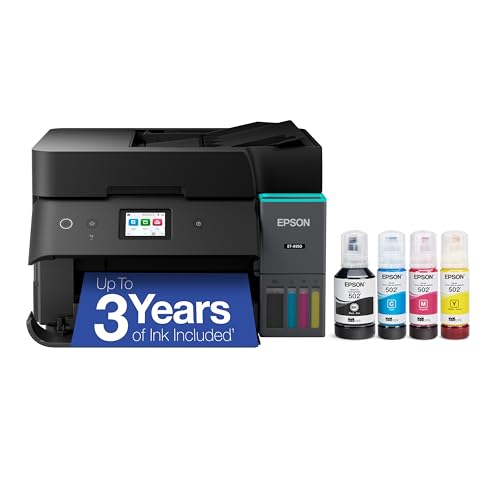 Epson Epson EcoTank ET-4950 Wireless Duplex All-in-One Cartridge-Free Supertank Colo |
Epson EcoTank Wireless All-in-One Ink Tank Printer – Cartridge-Free System, High-Capacity Ink B | $469.99 $499.99 |
#14 in Ink Tank Printers |
6% OFF In Stock |
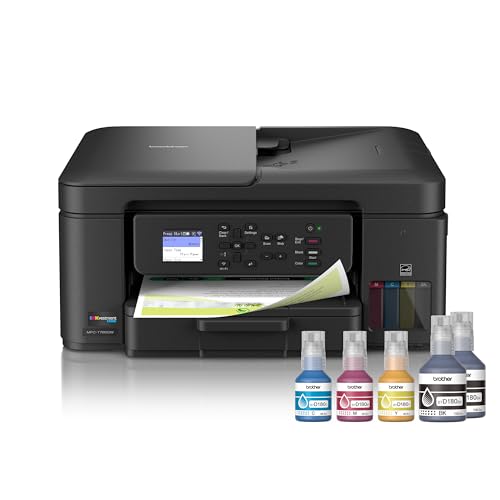 Brother Brother INKvestment Tank 780 Wireless Color Inkjet All-in-One Printer with Dup |
INNOVATIVE REFILLABLE INK TANK TECHNOLOGY: Brother Genuine no-spill bottles quickly refill the | $368.95 |
#55 in Ink Tank Printers |
|
 Canon Canon MegaTank G3270 All-in-One Wireless Color Printer |
Wireless Print/Copy/Scan | $159.00 $248.99 |
#2 in Ink Tank Printers |
36% OFF In Stock |
 Canon Canon Color imageCLASS MF753Cdw II – All-in-One Color Duplex Laser Printer |
Color, Wireless, Duplex 4-in-1: Print, scan, copy, fax. | $494.95 $702.99 |
#11 in Laser Printers |
30% OFF In Stock |
 Brother Brother MFC-J1010DW Wireless Color Inkjet All-in-One Printer, Duplex Printing, |
FULL FUNCTIONALITY IN A COMPACT SIZE – Print, copy, scan, and fax with business-level features | $178.00 |
#6 in Inkjet Printers |
Only 4 left in stock – order soon. |
 Canon Canon PIXMA TR4720 All-in-One Wireless Color Inkjet Printer, Black – Print Cop |
$74.67 |
#214 in Ink Tank Printers |
In Stock |
1. HP OfficeJet Pro 9125e — best overall
CNET’s testing sums this machine up better than any spec sheet: “of the printers I’ve tested so far, the OfficeJet Pro is the most versatile.” It prints, scans, copies and faxes, it does automatic two-sided printing and scanning, it has an automatic document feeder and a 250-sheet tray, and at $169.99 it costs less than several print-only machines in this guide. If one printer has to cover a household and a small office, this is the shape you want.
The compromise is the one every cartridge inkjet makes: the hardware is cheap and the ink is not. CNET also flags the honest cons — photos come out slightly dimpled and the machine is loud. Neither will matter if you are printing documents; both will if you are printing photographs every week.
What we like
- CNET’s best overall pick: “of the printers I’ve tested so far, the OfficeJet Pro is the most versatile”
- Auto two-sided printing and scanning plus a 250-sheet tray and an automatic document feeder — the office features that matter daily
- Fast colour inkjet output for the price; CNET’s test notes the HP is ahead of most inkjets in its bracket
- Dual-band Wi-Fi that HP describes as self-healing, plus a full print/scan/copy/fax feature set
- Ships with three months of HP Plus ink at no extra cost if you enrol
What could be better
- CNET’s own con list: “dimpling in photos” and “pretty darn loud”
- This is a cartridge inkjet: the purchase price is low and the ink is where the money goes
- HP Plus ink is only free while you stay subscribed, and CNET notes you can only use HP inks while you are
- Star average on the listing we checked was the lowest of the seven, on a comparatively new listing
Flaws but not dealbreakers: it is loud, it dimples photos, and its ink is where the profit is. As a versatile document machine at $169.99 with duplex scanning and a feeder, it is the one we would put on a desk that has to do everything.
2. Epson EcoTank ET-4950 — best ink-tank all-in-one
TechRadar’s senior printer editor, who has tested more than 200 models, is unambiguous: “my top choice for most people is the Epson EcoTank ET-4950.” This is the machine that makes the ink question go away. Epson’s listing claims enough ink in the box for up to 6,600 black and 5,500 colour pages, refilled from keyed bottles that cannot be poured into the wrong tank, and it adds automatic duplex printing and duplex scanning — a combination the reviewer notes you normally do not find on mid-range printers.
At $469.99 it is the second-priciest printer here, and TechRadar’s one caveat is real: if you ignore the tanks and treat it like a normal inkjet, it drinks ink. This is a machine for people who print a lot, and it is priced accordingly. If you print a handful of pages a month, the HP or the Canon TR4720 further down this list will cost you less overall.
What we like
- TechRadar’s senior printer editor, after 200-plus models: “my top choice for most people is the Epson EcoTank ET-4950”
- Cartridge-free supertank with the listing claiming enough ink for up to 6,600 black and 5,500 colour pages in the box
- Auto duplex printing and duplex scanning, which the reviewer notes is unusual at this price point
- 18 black / 9 colour ISO pages per minute with no warm-up time, plus an ADF, fax and a 250-sheet tray
- Keyed EcoFit ink bottles that physically cannot be poured into the wrong tank
What could be better
- $469.99 is the second-highest price here; you are prepaying for years of ink rather than buying a cheap box
- TechRadar notes it “goes through inkjet cartridges fast” if you ignore the tanks — this machine rewards volume, not occasional use
- Epson’s own “world’s #1 selling supertank” line is a marketing claim from the manufacturer, not an independent test
Flaws but not dealbreakers: you pay $469.99 up front and you have to actually print enough to earn it back. If you print more than a few hundred pages a year, the arithmetic flips in its favour quickly — TechRadar’s editor calls it his top choice for most people, and the duplex scanning is the reason.
3. Brother INKvestment Tank 780 — best running costs
Tom’s Guide printed more than 500 pages to build its guide, and its winner is this Brother — because of one measured number: “just 0.3 cents per text page and under a penny per color page.” That is the cheapest running cost in this guide, and it is achieved with a refillable tank system whose no-spill bottles the listing says refill colour in about 30 seconds and black in about 65 seconds. Print, copy, scan and fax are all present, along with duplex printing and cloud connections to Drive, Dropbox, Box and OneDrive from the printer’s own screen.
The honest caveats: its star average on the listing we checked was 3.7, the weakest of the seven, and the reviewer pool is far smaller than the mainstream picks — this is a newer model, not a proven decade-old workhorse. It is also the one printer whose stock message Amazon’s API did not return at all, though its product page showed a working purchase option at $368.95.
What we like
- Tom’s Guide’s best overall printer after printing 500-plus pages: “just 0.3 cents per text page and under a penny per color page”
- Refillable tank system with no-spill bottles the listing says refill colour in 30 seconds and black in 65 seconds
- Duplex printing plus print, copy, scan and fax in one compact chassis
- Cloud app connections including Google Drive, Dropbox, Box and OneDrive from the printer’s own screen
- Independent reviewers rate its per-page running cost as the standout reason to buy it
What could be better
- Its star average on the listing we checked was 3.7 — the lowest here — and the review pool is far smaller than the mainstream picks
- It is the only printer in this guide that returned no stock message from Amazon’s API, though its product page showed a working purchase option
- Two separate refill bottles and a 30-65 second refill ritual is more hands-on than dropping in a cartridge
Flaws but not dealbreakers: the listing’s star average is the weakest here and the refill ritual is genuinely more work than swapping a cartridge. What you get in exchange is Tom’s Guide’s measured 0.3 cents per text page, which is the lowest running cost in this guide.
4. Canon MegaTank G3270 — best value ink tank
If you want the EcoTank’s economics without its price, this is the pick. TechRadar calls it a “cheap 3-in-1 ink tank with low running costs,” and Canon’s listing states up to two years of ink included and up to 6,000 black and 7,700 colour pages from one set of bottles. At $159 — 36% off its list price and $310 less than the EcoTank — it was ranked #2 in Amazon’s ink-tank category on our check date with one of the deepest review pools of any printer here.
What you give up is workflow automation. TechRadar is explicit that there is no automatic document feeder, no duplex printing and no duplex scanning, and that scans lose “a small amount of color and clarity” versus the originals. For single-sided documents — which is most home printing — none of that matters, and the per-page cost is what you keep.
What we like
- TechRadar’s cheap-ink-tank pick: “cheap 3-in-1 ink tank with low running costs”
- Canon states up to two years of ink included and up to 6,000 black and 7,700 colour pages from a single set of bottles
- Ranked #2 in Amazon’s ink tank category on our check date with a very deep review pool
- 36% off list at $159, which makes it the cheapest genuine refillable-tank printer here
- Wireless print, copy and scan with a small 1.35-inch display rather than a full touch panel, which keeps the price down
What could be better
- No automatic document feeder, no duplex printing and no duplex scanning — TechRadar flags all three as absent
- TechRadar found scanning loses “a small amount of color and clarity” against the originals
- Page-yield claims are Canon’s own test-condition figures, not an independent measurement
Flaws but not dealbreakers: no ADF, no duplex printing and no duplex scanning. If you mostly print single-sided documents and want the cheapest ink in the guide, none of those matter, and at $159 with two years of ink included it is the value pick.
5. Canon Color imageCLASS MF753Cdw II — best colour laser all-in-one
Everything above is an inkjet. This is the laser, and the difference shows up in exactly one place: speed and text sharpness. Tom’s Guide measured it printing “a five-page text document in 11.31 seconds, equivalent to 26.5 pages per minute” — roughly three times the measured speed of the ink-tank models. It is a true colour 4-in-1 with print, scan, copy and fax, plus duplex printing as standard, and toner lasts far longer per cartridge than inkjet ink does.
The trade is money at both ends: $494.95 to buy (30% off list) and, as Tom’s Guide notes, running costs that sit “on the more expensive end” once you are reordering toner. If you print colour documents in volume and want them to look like they came from an office, this is the machine. If you print photos, it is the wrong machine entirely.
What we like
- Tom’s Guide’s best all-in-one printer, measured at “a five-page text document in 11.31 seconds, equivalent to 26.5 pages per minute”
- True colour laser 4-in-1: print, scan, copy and fax, with duplex printing as standard
- 30% off list at $494.95, and toner lasts far longer per cartridge than inkjet ink
- Laser text quality is the reason to buy it: sharper, more consistent body text than any inkjet here
- Building-wide office duty cycle in a desktop footprint
What could be better
- Tom’s Guide notes it “is on the more expensive end with its pricier running costs” once you are buying toner
- The heaviest and largest machine in this guide, and the one that needs the most desk space
- Only a single feature line is published on the listing we checked, so specification detail has to come from the manufacturer’s own spec sheet
Flaws but not dealbreakers: it is expensive to buy and expensive to run, and it is big. It is also the only machine here that prints colour laser text at 26.5 pages per minute with a duplex workflow, so if volume and text sharpness are the job, the cost is the point.
6. Brother MFC-J1010DW — best budget all-in-one
This is the machine to buy when you want the office features without the office budget. CNET picks it as the budget option and describes it as “pretty good” in this price bracket with “impressive text quality” and quiet operation — notable, because cheap printers are usually loud. The listing quotes 17 black and 9.5 colour pages per minute with automatic two-sided printing, and it packs a 20-page automatic document feeder and a 150-sheet tray into a small chassis.
Two cautions. It is a cartridge machine, so per-page cost stays well above the tank printers above. And stock is thin: only four units were available when we checked, so the price you see may not last. At $178 for a duplex all-in-one with an ADF, it is still the best-value fully featured machine here.
What we like
- CNET’s best budget printer pick, described as “pretty good” in this price bracket with “impressive text quality” and quiet operation
- Duplex printing, a 20-page automatic document feeder and a 150-sheet tray in a genuinely small chassis
- Listing quotes 17 black and 9.5 colour pages per minute with automatic two-sided printing
- Ranked #6 in Amazon’s inkjet category with a deep, long-running review pool
- Cheapest way here to get an ADF plus duplex in one machine
What could be better
- CNET’s con list for the Brother budget line flags that ink cartridges are “incredibly small”
- Only four units were left in stock when we checked, so availability moves around
- Cartridge inkjet rather than a tank, so per-page cost stays well above the EcoTank and MegaTank picks
Flaws but not dealbreakers: small cartridges and a narrow paper tray. As a compact duplex all-in-one with an ADF for $178, it is the sensible pick for a student desk or a one-person office that prints a few dozen pages a week.
7. Canon PIXMA TR4720 — best cheap everyday printer
$74.67. That is the whole argument. This is a complete print, copy, scan and fax machine with a flatbed scanner and 4800 x 1200 dpi output for less than most print-only lasers cost, and it is small enough to live on a shelf. CNET’s assessment is refreshingly blunt: it “isn’t winning any awards in any category” but it is “middle of the road for a great price.”
Be clear about what you are buying. There is no document feeder and no duplex printing, the plastic feels like the price, and the ink will cost more per page than the printer did to buy. If your alternative to this is having no printer at all, it is the cheapest complete answer on Amazon.
What we like
- The cheapest printer in this guide at $74.67 — a complete print/copy/scan/fax machine rather than a print-only box
- CNET notes the TR4720 “isn’t winning any awards in any category” but is “middle of the road for a great price”
- 4800 x 1200 dpi output and a flatbed scanner at a price most print-only lasers cannot match
- Small enough to live on a shelf, which matters in a flat or a dorm
What could be better
- CNET’s verdict is honest: it “isn’t winning any awards in any category”
- Slow, plastic-feeling and built to a price; the ink will cost more per page than the printer cost to buy
- No ADF and no duplex printing at this price point
Flaws but not dealbreakers: it does nothing especially well and the ink is expensive. It also does everything at all for $74.67, which is the entire argument — if your alternative is no printer, this is the cheapest complete answer.
Cost per page: the only number that matters after you buy
Printer shopping is deliberately confusing about the one figure that decides whether you saved money. The purchase price is visible; the cost per page is buried in cartridge yields. Tom’s Guide describes its own method plainly: “to measure the cost of owning and operating a printer, we look at the current street price of ink refills and the estimated number of pages that each cartridge can produce, and calculate the cost for printing a single page.” That is the calculation worth doing before you buy, and it is why the tank machines in this guide win.
The gap is not marginal. Tom’s Guide measured its winner at “0.3 cents per text page and under a penny per color page.” A conventional cartridge inkjet commonly runs several times that per page once you buy ink at retail — which means a $74 cartridge printer can cost more than a $300 tank printer within a couple of years of ordinary household printing. Tom’s Guide names the three levers directly: “switching to a laser printer, opting for a tank-based inkjet printer or signing up for a subscription ink service.”
Run the maths on your own volume. Take the ink or toner price, divide by the published page yield, multiply by your monthly page count, and multiply that by 36. Do it before you buy and the ranking here mostly sorts itself: occasional printing goes to the cheap cartridge machines, regular printing goes to the tanks, and high-volume colour documents go to the laser.
Ink lock-in, subscriptions and what the FTC actually says
This is the part of printer marketing that most roundups ignore, and it is the part with an actual legal answer. Many printers now ship with free ink tied to a subscription, and the catch is usually stated in the small print. CNET spells it out for its own top pick: the free ink is welcome, “the downside is you can only use HP inks while subscribed to it.” CNET also warns that almost all ink subscriptions “offer you a certain number of months free” before billing starts, so the value depends on remembering to cancel.
How far can a manufacturer go? The FTC’s guidance on the Magnuson-Moss Warranty Act is direct: “generally, tie-in sales provisions aren’t allowed,” and it gives the exact shape of a prohibited provision — “to keep your new Plenum Brand Vacuum Cleaner warranty in effect, you must use genuine Plenum Brand Filter Bags.” Substituting printer ink for filter bags gives you the rule that matters: a brand cannot generally void your warranty merely because you used a third-party cartridge or bottle.
There is a real limit on the other side, and it is fair to state it. The same FTC guidance says “it is permissible to disclaim warranty coverage for defects or damage caused by the use of parts or service you didn’t provide.” In practice: a third-party cartridge will not, by itself, kill your warranty — but if a bad cartridge physically damages the print head, the resulting damage is a different question. And note what the Act does clearly protect: a written warranty cannot disclaim the implied warranty of merchantability, so the printer still has to do what a printer is supposed to do.
Where we disagree with the big reviewers
The three testers here each printed hundreds of pages, and they each picked a different printer. CNET’s best overall is the HP OfficeJet Pro 9125e, because it is the most versatile machine its tester has used. Tom’s Guide’s best overall is the Brother INKvestment Tank 780, because it has the lowest measured cost per page. TechRadar’s “top choice for most people” is the Epson EcoTank ET-4950, because of its feature set and duplex scanning. Three competent labs, three different answers, no contradiction — they are optimising for different things.
Our ranking deliberately puts the $169.99 HP first rather than the more fashionable tanks, for one reason: most people buying a first printer for a home office need versatility and a low entry price, and only then discover their real volume. If you already know you print hundreds of pages a month, Tom’s Guide is right and the Brother should be your pick; if you want the least-fiddly long-term machine and you print a lot of duplex documents, TechRadar is right and the Epson wins. We also part company with TechRadar on one point of framing: its editor writes that he pays “particular attention to the COO (cost of ownership) because cheap printers can often give lower value for money,” and we agree — but we would add the caveat the list itself cannot carry, which is that a tank printer can be the more expensive choice for a low-volume household.
Where paying more stops buying better
Under $100 buys a complete but compromised machine. The Canon TR4720 at $74.67 prints, copies and scans, and it is the right answer if the alternative is no printer — but there is no ADF, no duplex, and ink is expensive. $150–$200 is where a home printer stops being a compromise: duplex printing, an ADF, wireless, and either a refillable tank (the Canon MegaTank G3270 at $159) or a full-feature cartridge machine (the HP OfficeJet Pro at $169.99, the Brother MFC-J1010DW at $178). This band contains the sensible defaults in this guide.
$300–$400 buys the running-cost machines. The Brother INKvestment Tank 780 at $368.95 is here, and what you are paying for is Tom’s Guide’s measured 0.3 cents per text page. $450 and up buys speed, duplex scanning and laser text: the Epson EcoTank ET-4950 at $469.99 and the Canon Color imageCLASS MF753Cdw II at $494.95. Above roughly $500 on Amazon you are buying office duty-cycle hardware — heavier paper paths, bigger trays, higher monthly volume ratings — none of which changes how a two-person household prints. That is the stop point: past it, you are buying capacity you will not use.
The failure modes to watch for
- Cartridge prices that beat the printer’s. A $74 printer whose ink costs more per page than a tank model is not cheap; it is deferred expensive. Check the refill price before the hardware price.
- Subscription lock-in. Free ink months are real, and so is the condition CNET flags: some programs only let you use the brand’s own ink while subscribed.
- Ink drying out in a rarely used printer. Inkjet print heads clog when they sit idle. TechRadar notes its cheap-ink-tank pick is not particularly fast and can use cartridges quickly if used like a normal inkjet — and CNET’s DTF pick is flagged as needing constant use or the print head can break. Both point the same way: match the machine to your real volume.
- No ADF and no duplex, discovered too late. These are the two features people regret skipping, and they are absent from the Canon MegaTank G3270 and the Canon TR4720. If you scan multi-page documents, buy a machine with a feeder.
- Quoted pages-per-minute versus measured. Manufacturers quote ISO-condition speeds; testers measure real documents. Expect the measured number to be lower, and treat any single figure as a rough ranking rather than a promise.
- Small cartridges and small trays. CNET flags that the budget Brother line’s cartridges are “incredibly small,” and a 150-sheet tray means more refilling. Both are quiet ongoing annoyances rather than failures.
- Toner that outlasts the printer’s relevance. Laser toner is cheaper per page, but the starter cartridge in a new machine is often partial, and replacements are not cheap. Check whether the toner included is full-yield.
- Static energy draw. ENERGY STAR notes that certified imaging equipment is required to sleep and wake quickly — a genuinely useful difference if the printer lives in a bedroom or office you sit in all day.
Who should skip which printer
- Skip the HP OfficeJet Pro 9125e if you print photos as a hobby — CNET’s own con list names dimpling and noise.
- Skip the Epson EcoTank ET-4950 if you print fewer than a few hundred pages a year; you will never earn back the $469.99.
- Skip the Brother INKvestment Tank 780 if you want a long-proven model with a big review history — this one is new and its listing rating is the weakest here.
- Skip the Canon MegaTank G3270 if you scan or copy multi-page documents; there is no document feeder and no duplex.
- Skip the Canon Color imageCLASS MF753Cdw II if photos matter, if desk space is tight, or if you want the cheapest way in — it is none of those things.
- Skip the Brother MFC-J1010DW if you print more than a few dozen pages a week; cartridge ink will cost you more than the tank machines within a year.
- Skip the Canon PIXMA TR4720 if you need speed, duplex or a feeder — the price is the entire point, and it shows.
Frequently asked questions
Inkjet or laser — which should I buy? Inkjet for photos, graphics and mixed colour documents; laser for volume text and sharper body copy. CNET puts it simply: colour inkjets are better for images, while lasers are “best for text,” and laser toner “lasts much longer than Inkjet ink.” If you are printing mostly black-and-white documents in bulk, a laser will usually cost less per page.
Are ink tank printers worth it? They are worth it if you print regularly, and a waste if you do not. TechRadar notes that “most of the best inkjet printers I’ve reviewed are ink tank models now,” and that in a sign of an industry shift, tanks have displaced cartridges at the top of its list. The cost is up front; the saving accrues over years of printing.
Can a printer maker void my warranty for using third-party ink? Generally no. The FTC’s warranty guidance says tie-in sales provisions — requirements that you buy the brand’s own supplies to keep coverage — “aren’t allowed,” and it gives the filter-bag example as a prohibited provision. What a manufacturer may do is disclaim coverage for damage actually caused by parts it did not supply. Keep your receipts and read the warranty statement.
Do I need an ink subscription? Only if you like the maths. CNET warns that subscriptions “offer you a certain number of months free” before billing starts and that, on its own top pick, you can only use the brand’s ink while subscribed. If you print unpredictably, buy ink outright.
Does ENERGY STAR matter on a printer? A little, and it costs nothing to check. ENERGY STAR’s imaging equipment programme states that if all imaging equipment in the United States were certified, the country would save more than $32 million in electricity costs and prevent 596 million pounds of greenhouse gas emissions a year — equal to the emissions from more than 57,000 vehicles. Certified printers are also required to wake from and return to sleep mode quickly and to ship with automatic double-sided printing enabled.
What about a printer that is out of stock at the price I saw? Prices and stock on Amazon move daily, and two of the picks here had thin stock when we checked. Use the buttons in this guide to see today’s live price rather than trusting the figure in the table, which is a September 18, 2026 snapshot.
Sources and methodology
Institutional and primary: Federal Trade Commission, “Businessperson’s Guide to Federal Warranty Law” (Magnuson-Moss Warranty Act: tie-in sales provisions prohibited, implied warranties cannot be disclaimed when a written warranty is offered, damage caused by non-supplied parts may be excluded); ENERGY STAR, Imaging Equipment programme (certification criteria, duplex and sleep-mode requirements, and the national electricity and emissions figures).
Independent testers: Tom’s Guide, “We printed 500+ pages to find the best printers of 2026” (updated July 2026; timed print tests, duplex throughput measurements and the refill-price-divided-by-yield cost-per-page method); TechRadar, “Best all-in-one printer” (senior printer editor Jim Hill, more than 200 models tested, cost-of-ownership emphasis, duplex-scan and ADF assessments); CNET, “Best Printer for Your Home or Office in 2026” (industry-standard image-quality references including stippling and dimpling checks, ink-subscription and lock-in notes).
How this guide was built: seven printers were selected from live Amazon search results across four intent groups (budget cartridge, ink tank, high-volume tank, colour laser), then every listed specification — quoted ISO print speeds, ink system, duplex and ADF support, tray capacity, stated page yields, best-seller rank and price — was read from the product pages on September 18, 2026 and verified through Amazon’s product API the same day. Star averages are the listings’ own; review counts are deliberately omitted because Amazon served identical counters across unrelated listings in the same session. What we did not do: we did not run timed print tests, measure noise, weigh ink consumption or test durability, and no figure in this guide comes from a test we did not run. Related buying guides: monitor light bars, desk lamps and monitor arms. Our full process is on the How We Test & Choose Products page.