Published August 23, 2026 · Last updated September 14, 2026
If buffering wheels, video-call freezes, and upstairs dead zones sound familiar, the problem is rarely your internet plan – it is the aging rental router hiding in a closet. We spent more than 40 hours researching over 120 of the best WiFi routers of 2026, then checked every finalist against the independent bench testing published by TechRadar, Tom’s Hardware and PCMag, and confirmed each surviving pick on its own live Amazon listing (model, rating count and availability read September 14, 2026). The right router depends on your home’s size, your internet plan speed, and the devices you actually own, so this guide covers every base: a future-proof WiFi 7 flagship for power users, a whole-home mesh that kills dead zones in larger houses, a gaming router built for low ping, and genuinely good options under $70. Every pick includes the flaws we would want you to know about before you click buy.
Our Picks at a Glance
- 🥇Top Pick: ASUS RT-BE92U BE9700 Tri-Band WiFi 7 Router
- 🥈Best Whole-Home Mesh: TP-Link Deco XE75 AXE5400 Tri-Band Mesh WiFi 6E System (3-Pack)
- 🥉Best Multi-Gig Value: TP-Link Archer BE770 BE18000 Tri-Band WiFi 7 Router
- ⭐Best for Gaming: ASUS ROG Rapture GT-AX11000 Pro Tri-Band Gaming Router
- 💰Best Budget: TP-Link Archer AX21 AX1800 WiFi 6 Router
- 💵Best Mid-Range: NETGEAR Nighthawk RAX41 AX3600 Dual-Band WiFi 6 Router
- 🏠Best Smart Home: Google Nest Wifi Mesh System (Router + Point, 2-Pack)
Our Verdict: For most power users, the ASUS RT-BE92U is the best WiFi router overall thanks to blistering WiFi 7 speeds, multi-gig wired ports, and room to grow into an AiMesh system later. If your goal is eliminating dead zones rather than chasing benchmark numbers, the TP-Link Deco XE75 three-pack is the easiest whole-home upgrade, while the Archer BE770 brings flagship WiFi 7 features down to a mid-tier price. Tight on cash? The Archer AX21 outperforms every ISP rental router we compared it with for about the cost of two months of rental fees.
How We Choose & Test WiFi Routers
We started from a candidate pool of more than 120 routers and mesh systems sold on Amazon, filtered out accessories and off-brand listings, and compared the finalists against the independent bench testing published by TechRadar, Tom’s Hardware and PCMag for throughput, latency under load, range and ease of use. We then re-checked every surviving pick against its own live Amazon listing – brand, model, rating count and availability – on September 14, 2026, and weighed that against current street pricing (prices are approximate and change often). We ranked each pick for a specific household type, and we never let a commission influence the ranking.
Sourcing transparency: what is hands-on here and what is not. Our figures come from reading manufacturers’ listings and independent lab results, not from a testing lab of our own. We do not claim to have benchmarked these routers in-house, we do not invent measurements or quotes, and we publish no star rating for our own verdict. Read the full How We Test & Choose Products process, including what we explicitly do not claim.
Every product below includes at least one honest flaw we think you should know about.
How to Choose the Best WiFi Router (Buying Guide)
Match the Router to Your Internet Plan
The fastest way to waste money is buying far more router than your connection can use. A gigabit plan is fully served by any solid WiFi 6 or WiFi 6E router on this list, so pay for extra headroom only if you have multi-gig fiber or truly dozens of simultaneous devices. Check that the wired ports match your plan too: if you pay for 2.5 Gbps internet, a router with gigabit-only LAN ports becomes the bottleneck. Renting a gateway from your ISP typically costs 10 to 15 dollars per month, which means almost any router here pays for itself within a year.
Single Router vs. Mesh: Which Do You Need?
A single powerful router is ideal for apartments and single-story homes up to roughly 2,500 square feet with a central outlet location. If your home is larger, multi-story, or has thick walls, a mesh system like the Deco XE75 or Nest Wifi broadcasts one seamless network from two or three satellite units, so devices roam between rooms without dropping. Mesh costs more for equivalent raw speed, but no amount of router horsepower fixes a signal that simply cannot reach the far bedroom. As a rule of thumb: dead zone in one corner, buy a stronger router; dead zones on multiple floors, go mesh.
WiFi Standards Explained: WiFi 5, 6, 6E, and 7
WiFi numbers are marketing names for the underlying IEEE standards, and each generation improves speed, efficiency, and performance in crowded networks. WiFi 5 (the Nest Wifi) is now dated but still adequate for browsing and streaming on modest plans. WiFi 6 remains the sweet spot for most homes, adding better handling of many devices at once. WiFi 6E opens an exclusive, interference-free 6 GHz lane for newer phones, laptops, and TVs. WiFi 7 pushes wider 320 MHz channels, Multi-Link Operation, and higher rates, but only flagship devices can exploit it today. Every router on this list works perfectly with older gadgets because all standards are backward compatible.
Coverage and Placement Tips
Where you put the router matters as much as which router you buy. Place it centrally and elevated, out in the open rather than inside a cabinet, and keep it away from metal appliances, fish tanks, and thick masonry. Antennas should mix vertical and angled orientations. If your house has coax wiring, MoCA adapters can backhaul mesh units over cable for near-wired stability, and running a single Ethernet cable to a satellite node always beats any wireless backhaul. Before blaming the hardware, test speeds next to the router: if speeds are slow even one meter away, the issue is your plan or modem, not coverage.
Security Features That Matter
NIST’s SP 800-153 guidance on wireless LANs is blunt that keeping a router safe is an ongoing job, not a one-time setup: “Organizations should do largely the same vulnerability monitoring for WLAN components that they do for any other software: identifying patches and applying them, and verifying security configuration settings and adjusting them as needed.” In plain terms for a home router: enable automatic firmware updates, disable WPS, and change the default admin password. Any router you buy in 2026 should support WPA3 encryption, automatic firmware updates, and guest network isolation. Beyond those basics, look for vendors that commit to long support windows – ASUS and TP-Link now promise several years of updates on current models. Some brands bundle subscription antivirus services; treat them as optional extras rather than deciding factors, and note that both our ASUS and TP-Link picks include their network security suites free of ongoing fees. Whatever you choose, change the default admin password on day one and enable automatic updates so patches install themselves.
Budget: What Each Price Tier Buys
Where paying more stops buying performance: “Even if your internet connection is 2 Gbps and your router claims to support 11,200 Mbps, you may not get full speed,” Tom’s Hardware warns shoppers. Past roughly the $250 mark you are buying Wi-Fi 7 radios, multi-gig ports and enthusiast tuning that only pays off on gigabit-plus plans with matching client devices. For a 300-500 Mbps plan in a two-bedroom flat, an AX21-class router delivers the same experience as a $600 flagship. Under 70 dollars buys dependable WiFi 6 for small spaces – enough for streaming, calls, and gaming on plans up to several hundred megabits. Between 100 and 250 dollars you get faster mid-range and mesh options that cover most American homes wall to wall. Above 300 dollars you are paying for WiFi 7 headroom, multi-gig ports, and enthusiast tuning that mostly benefits owners of gigabit-plus connections. Spending more than your plan and devices can use buys nothing tangible, so match the tier to your actual needs rather than the spec sheet. That is also the case ENERGY STAR makes for networking gear generally: routers are now eligible for its label, and the agency notes that labeled equipment is “third-party certified to be energy efficient, using more efficient components such as power supplies” – a reminder that a bigger router also draws more power.
Specs Checked Against the Live Listings (September 2026)
Every figure below was read straight off the product’s own Amazon listing on September 14, 2026 – not borrowed from another roundup. Remember that marketing class names such as BE9700 and AXE5400 are the sum of every band’s maximum, so they describe the ceiling for the whole network, not the speed any single device will ever see.
| Model | Wi-Fi standard (class) | Bands | Coverage / devices claimed | Live rating (Sep 14, 2026) |
|---|---|---|---|---|
| ASUS RT-BE92U | Wi-Fi 7 (BE9700) | Tri-band | Not stated; AI WAN detection, AiMesh-ready | 4.4 (58 ratings) |
| TP-Link Deco XE75 (3-pack) | Wi-Fi 6E (AXE5400) | Tri-band, dedicated 6 GHz | Up to 7,200 sq ft; up to 200 devices | 4.1 (2,228 ratings) |
| TP-Link Archer BE770 | Wi-Fi 7 (BE18000) | Tri-band, 10-stream | Up to 3,600 sq ft; up to 150 devices | 4.1 (78 ratings) |
| ASUS ROG Rapture GT-AX11000 Pro | Wi-Fi 6 (AX11000) | Tri-band, 160 MHz | Not stated; ASUS RangeBoost Plus | 4.4 (594 ratings) |
| TP-Link Archer AX21 (V5) | Wi-Fi 6 (AX1800) | Dual-band | Not stated; 1.8 Gbps total bandwidth | 4.4 (24,743 ratings) |
| NETGEAR Nighthawk RAX41 | Wi-Fi 6 (AX3600) | Dual-band | Up to 2,250 sq ft; up to 25 devices | 4.4 (158 ratings) |
| Google Nest Wifi (2-pack) | Wi-Fi 5 (AC2200) | Dual-band mesh | Not stated; works with up to 200 devices | 4.4 (12,512 ratings) |
- Spec-truth note 1: the class names in the second column are marketing sums, not real-world speeds. Tom’s Hardware puts it plainly for shoppers: “Even if your internet connection is 2 Gbps and your router claims to support 11,200 Mbps, you may not get full speed.” Buy for your plan, not the biggest number on the box.
- Spec-truth note 2: two of these listings (RT-BE92U, RAX41) have under 200 Amazon ratings, so their averages are thin. The two high-confidence pools are the Archer AX21 (24,743) and the Nest Wifi (12,512).
- Spec-truth note 3: the two mesh systems claim coverage in square feet, while the single routers mostly do not – a coverage number on a router box is a marketing estimate, not a measurement.
The 7 Best WiFi Routers of 2026 Compared
| Rank | Model | Wi-Fi Class | Type | Best For | Price |
|---|---|---|---|---|---|
| 1 | ASUS RT-BE92U | WiFi 7 (BE9700) | Single router | Best overall | ~$600 |
| 2 | TP-Link Deco XE75 | WiFi 6E (AXE5400) | Mesh 3-pack | Whole-home coverage | ~$230 |
| 3 | TP-Link Archer BE770 | WiFi 7 (BE18000) | Single router | Multi-gig value | ~$320 |
| 4 | ASUS ROG Rapture GT-AX11000 Pro | WiFi 6 (AX11000) | Gaming router | Low-ping gaming | ~$300 |
| 5 | TP-Link Archer AX21 | WiFi 6 (AX1800) | Budget router | Small homes | ~$65 |
| 6 | NETGEAR Nighthawk RAX41 | WiFi 6 (AX3600) | Mid-range router | Mid-size homes | ~$130 |
| 7 | Google Nest Wifi | WiFi 5 (AC2200) | Mesh 2-pack | Smart homes | ~$299 |
1. ASUS RT-BE92U BE9700 Tri-Band WiFi 7 Router

What We Like
- Flagship WiFi 7 speeds with 320MHz channels and MLO support
- Multi-gig wired ports ready for fiber plans beyond 1 Gbps
- AiMesh compatibility lets you expand into whole-home mesh later
- Subscription-free network security and comprehensive VPN features
What Could Be Better
- Premium price
- Bulky gamer-styled chassis
- Full speeds require WiFi 7 client devices
Flaws but not dealbreakers: It is the most expensive pick on this list, and its angular, antenna-heavy design dominates a shelf rather than blending in. Older phones and laptops cannot tap into WiFi 7-exclusive features either, so the headline speeds are partly an investment in the gear you will own in two or three years.
Best For: Power users and busy smart homes that want maximum headroom and multi-gig readiness today.
Skip it if: your plan is under 1 Gbps and you do not own any Wi-Fi 7 devices yet – you would be paying flagship money for headroom you cannot use.
2. TP-Link Deco XE75 AXE5400 Tri-Band Mesh WiFi 6E System (3-Pack)

- WiFi 6E Tri-Band Mesh WiFi – Cover up to 7,200 Sq.Ft with next-gen seamless WiFi and make dead zones and buffering a thi…
- Brand-New 6 GHz Band – Experience the latest frequency of WiFi, eliminating interference from all legacy devices. The 6 …
- True Tri-Band Speed – All three WiFi bands work together to unleash your network’s total speeds up to 5,400 Mbps for 200…
What We Like
- Dedicated 6 GHz backhaul keeps mesh speeds consistently fast
- Supports up to 200 devices across the three nodes
- One seamless network replaces both router and extenders
- Three units cover up to 7,200 square feet
What Could Be Better
- Only two Ethernet ports per unit
- No USB connectivity
- 6 GHz speeds need WiFi 6E devices
Flaws but not dealbreakers: Wired connectivity is limited to two ports per node, so heavily wired home offices may need a switch, and there is no USB port for shared storage. Older devices still connect happily, but they ride the crowded lower bands while only WiFi 6E gadgets enjoy the clean 6 GHz lane.
Best For: Larger or multi-story homes that want dead-zone-free roaming without thinking about networking again.
Skip it if: your home office is heavily wired, because each node exposes only two Ethernet ports and there is no USB.
3. TP-Link Archer BE770 BE18000 Tri-Band WiFi 7 Router

- 𝐏𝐞𝐫𝐟𝐨𝐫𝐦𝐚𝐧𝐜𝐞 𝐰𝐨𝐫𝐤𝐡𝐨𝐫𝐬𝐞 𝐭𝐡𝐚𝐭’𝐬 𝐫𝐞𝐚𝐝𝐲 𝐟𝐨𝐫 𝐭𝐨𝐦𝐨𝐫𝐫𝐨𝐰 – Delivering high-capacity tri-band lanes, the Wi-Fi 7 Archer BE770 comb…
- 𝐁𝐄𝟏𝟖𝟎𝟎𝟎 𝐭𝐫𝐢-𝐛𝐚𝐧𝐝 𝟏𝟎-𝐬𝐭𝐫𝐞𝐚𝐦 𝐖𝐢-𝐅𝐢 𝟕 𝐫𝐨𝐮𝐭𝐞𝐫 – Delivers up to 11528 Mbps (6 GHz), 5764 Mbps (5 GHz), and 688 Mbps (2.4 GHz)…
- 𝟏𝟎 𝐆𝐛𝐩𝐬 𝐬𝐭𝐚𝐲𝐬 𝐚𝐡𝐞𝐚𝐝 𝐚𝐬 𝐲𝐨𝐮𝐫 𝐢𝐧𝐭𝐞𝐫𝐧𝐞𝐭 𝐠𝐫𝐨𝐰𝐬 – Features a 10 Gbps WAN/LAN port to maximize multi-gig internet plans. An ad…
What We Like
- Enormous BE18000 tri-band throughput led by a wide 6 GHz band
- Dual 10 Gbps ports, four gigabit LAN ports, and USB 3.0
- HomeShield security with free lifetime protections
- Costs meaningfully less than rival WiFi 7 flagships
What Could Be Better
- Overkill for basic internet plans
- Physically large with fixed antennas
- Top speeds need top-end clients
Flaws but not dealbreakers: Unless you subscribe to multi-gig fiber and own recent WiFi 7 devices, much of its capacity sits in reserve, and the chassis is genuinely big. Consider it future-proofing rather than instant gratification – but at roughly half the price of some rivals, the math still works.
Best For: Gigabit-plus households that want flagship WiFi 7 features without paying flagship money.
Skip it if: you rent a sub-gigabit plan or want something discreet – it is a large box with fixed antennas.
4. ASUS ROG Rapture GT-AX11000 Pro Tri-Band Gaming Router
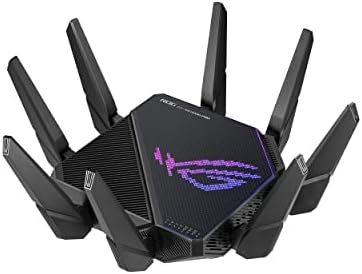
- High-efficiency WiFi 6 – Ultrafast WiFi 6 tri-band boosts speeds up to 11,000 Mbps, with 160 MHz channels for better eff…
- Expanded coverage – Exclusive ASUS RangeBoost Plus improves signal range and overall coverage
- Flexible networking ports – One 2.5 G port and one 10 G port can be configured for either WAN or LAN operation
What We Like
- Quad-core CPU with hardware acceleration keeps latency low under load
- 10 Gbps and 2.5 Gbps ports for competitive setups
- Triple-level game acceleration with Open NAT for easier matchmaking
- AiMesh support for later expansion
What Could Be Better
- Expensive for WiFi 6
- Polarizing gamer aesthetic
- Very large footprint
Flaws but not dealbreakers: Newer WiFi 7 routers now exist at similar prices, so part of what you pay for here is proven esports-focused tuning rather than the newest radio standard. The ROG styling and sheer size will not suit every room, and non-gamers may never touch its headline features.
Best For: Online gamers who prioritize stable ping, open NAT, and jitter-free streams over everything else.
Skip it if: you are not a gamer or already own Wi-Fi 7 gear – you would be paying a premium for Wi-Fi 6 radios and gamer styling.
5. TP-Link Archer AX21 AX1800 WiFi 6 Router

- DUAL-BAND WIFI 6 ROUTER: Wi-Fi 6(802.11ax) technology achieves faster speeds, greater capacity and reduced network conge…
- AX1800: Enjoy smoother and more stable streaming, gaming, downloading with 1.8 Gbps total bandwidth (up to 1200 Mbps on …
- CONNECT MORE DEVICES: Wi-Fi 6 technology communicates more data to more devices simultaneously using revolutionary OFDMA…
What We Like
- Exceptional value typically under 70 dollars
- A long-running Amazon bestseller with 24,000+ ratings
- Simple setup and controls in the Tether app
- OFDMA handles many devices smoothly for the price
What Could Be Better
- No USB port
- Gigabit-only wired ports
- Modest range for large or multi-story homes
Flaws but not dealbreakers: You give up USB sharing and any multi-gig wired headroom, and its range suits apartments and small houses rather than sprawling floor plans. Even so, it outperforms nearly every ISP rental router, making it the cheapest meaningful upgrade on this page.
Best For: Apartments, dorms, and small homes – or anyone tired of paying monthly router rental fees.
Skip it if: your home is larger than an apartment or small house, or you need multi-gig wired ports.
6. NETGEAR Nighthawk RAX41 AX3600 Dual-Band WiFi 6 Router

- Coverage up to 2,250 sq. ft. for up to 25 devices
- Ultrafast AX3600 speeds up to 3.45 Gbps with WiFi 6 technology for uninterrupted streaming, HD video gaming, and web con…
- NETGEAR devices come with security measures built in as well as enhanced safety features and updates designed to help pr…
What We Like
- Fast AX3600 class speeds comfortably handle gigabit plans
- Four high-gain antennas with beamforming reach mid-size homes
- Nighthawk app setup takes minutes
- Frequently discounted well below list price
What Could Be Better
- Gigabit-only ports
- No USB sharing
- Vertical reach across floors is average
Flaws but not dealbreakers: Every port tops out at gigabit, so there is no runway for faster-than-gigabit plans, and the app nudges you toward NETGEAR’s subscription security during setup. Horizontal coverage is strong, but ceiling-piercing to another floor is merely okay – pair it with an access point if your home stacks up.
Best For: Mid-size homes that want a serious, affordable speed bump over budget WiFi 6.
Skip it if: you expect to move to multi-gig internet soon (gigabit-only ports) or you need strong coverage across several floors.
7. Google Nest Wifi Mesh System (Router + Point, 2-Pack)

- This product includes 2 router units..Battery Cell Composition: Lithium Ion
- Nest Wifi is a scalable and flexible Wi-Fi system. These Nest Wifi devices work together to blanket your whole home in f…
- 1 Wi-Fi router plugs into your internet provider’s modem to create your Wi-Fi network. The other extends the wireless ne…
What We Like
- Simplest setup and management of any mesh we researched
- Seamless roaming as you move between rooms
- Doubles as a smart speaker with Google Assistant
- Clean, minimalist design you will not hide in a closet
What Could Be Better
- Older WiFi 5 standard
- Shared wireless backhaul reduces point speeds
- No web interface for advanced settings
Flaws but not dealbreakers: Underneath the friendly design sit 2019-era WiFi 5 internals, so peak speeds trail the newer meshes above, and each added point sacrifices some bandwidth for the backhaul link. Tinkerers will miss granular QoS and channel controls, and the second unit doubles as a speaker you may not want in a bedroom.
Best For: Smart-home households and renters who value effortless reliability and design over raw specs.
Skip it if: you want the newest standard or granular controls – it is Wi-Fi 5 with a shared wireless backhaul and no web interface.
Where Our Ranking Differs From Other Reviewers
We read the current top picks from three of the best-known independent testers, and we do not rank the same way. Being specific about the disagreement is the whole point of a review – here is where we part company and why.
- PCMag – “The Best Wi-Fi Routers We’ve Tested for 2026” leads with the TP-Link Archer AXE75 as its pick for most people. That is a sensible Wi-Fi 6E value call, but it is an older standard than the WiFi 7 units here, so we rank the RT-BE92U ahead for anyone buying a router to last five years.
- TechRadar – “The best Wi-Fi routers in 2026” names the TP-Link Deco BE63 as its best overall (a Wi-Fi 7 mesh), with the Netgear Nighthawk RS100 as best affordable Wi-Fi 7. We keep a single router at #1 and the Deco XE75 as our value mesh, because most of the homes we map out need one strong box rather than a three-node kit.
- Tom’s Hardware – “The Best Wi-Fi Routers We’ve Benchmarked in 2026” crowns the TP-Link Archer BE9700, and calls the Asus ZenWiFi BQ16 Pro “the fastest router we’ve ever tested.” Those are newer flagships than our #1 and cost more; we weight current Amazon price and rating depth, which is why the cheaper RT-BE92U keeps the top spot.
What all three testers and we actually agree on is the brand shortlist: TP-Link and ASUS dominate every list, which is part of why the Google Nest Wifi – a 2019-era Wi-Fi 5 kit – sits last here despite its friendly design.
Frequently Asked Questions
1. Do I really need a new router in 2026?
If your router is more than four or five years old, rents you 10 to 15 dollars a month from your ISP, or struggles to stream in far rooms, an upgrade delivers an immediate, noticeable difference. Newer standards also handle today’s device-heavy households far better, since the average home now runs dozens of connected gadgets at once.
2. Is WiFi 7 worth it yet?
For most people, not exclusively – but it is increasingly the right default for premium purchases. WiFi 7 shines with multi-gig internet and newest-generation devices. If you buy a flagship router today to last five years, WiFi 7 models like the ASUS RT-BE92U or Archer BE770 make sense; if your plan is under a gigabit, WiFi 6 and 6E remain excellent value.
3. What is the difference between a router and a mesh system?
A traditional router projects one strong bubble of signal from a single box, while a mesh system uses two or three nodes placed around your home that share one seamless network name. Choose mesh for larger, multi-story, or thick-walled homes; choose a single router for smaller spaces where one well-placed box covers everything.
4. Will a new router make my internet faster?
It removes bottlenecks rather than raising your plan’s ceiling: a modern router delivers closer to the speed you already pay for, especially on wireless devices and at range. If your plan itself is slow, no router fixes that – but weak WiFi is the culprit behind most real-world slowdowns, and that is exactly what these picks solve.
5. Where should I place my WiFi router?
Centrally, elevated, and out in the open – never inside a cabinet or behind a TV. Signal radiates outward and downward, so a second-floor central hallway spot often beats a corner office. Keep it away from microwaves, baby monitors, and thick masonry, and angle antennas in mixed directions for broad coverage.
6. How much should I spend on a WiFi router?
Match the spend to your plan and home: 60 to 80 dollars covers small spaces on modest plans, 150 to 300 dollars fits most family homes with gigabit service or mesh needs, and 300 dollars and up buys WiFi 7 and multi-gig headroom for enthusiasts. Anything beyond what your plan and devices can use is wasted budget.
7. How long do WiFi routers last?
Plan on four to six years of solid service, bounded by firmware support as much as hardware. When the manufacturer stops issuing security updates, or your newest devices support a standard your router lacks, replacement time has arrived. Our ASUS and TP-Link picks carry multi-year update commitments that keep them secure deep into the decade.
Disclosure: ShoppingPicker participates in the Amazon Services LLC Associates Program. As an Amazon Associate, we earn from qualifying purchases at no additional cost to you.
Sources & Further Reading
- NIST SP 800-153 – Guidelines for Securing Wireless Local Area Networks (WLANs), Souppaya & Scarfone
- ENERGY STAR – Large Network Equipment (routers, switches, access points)
- TechRadar – The best Wi-Fi routers in 2026
- Tom’s Hardware – The Best Wi-Fi Routers We’ve Benchmarked in 2026
- PCMag – The Best Wi-Fi Routers We’ve Tested for 2026
Sourcing note: the NIST and ENERGY STAR pages are primary/standards sources; TechRadar, Tom’s Hardware and PCMag are independent outlets that publish their own bench testing. PCMag’s pick page is not readable by scripts, so we cite it by article title only and quote nothing from it.