Best Mechanical Keyboard for Programmers in 2026: Top 7 Picks for Coding Comfort
Are you tired of your current keyboard slowing down your coding workflow? The right mechanical keyboard for programmers can significantly improve your typing speed, reduce fatigue, and enhance your overall coding experience. As someone who spends hours crafting code, you deserve a keyboard that keeps up with your demands. In this comprehensive guide, we’ll explore the top mechanical keyboards specifically designed for programmers in 2026, helping you find the perfect match for your coding needs.
When selecting a mechanical keyboard for programmers, factors like key switches, build quality, programmability, and ergonomic design play crucial roles. Our recommendations balance performance, comfort, and value to help you work more efficiently. For those interested in other productivity-enhancing gear, check out our guide to the best webcams for streaming under $150, which can complement your coding setup.
How We Chose the Best Mechanical Keyboards for Programmers
We’ve meticulously evaluated numerous mechanical keyboards for programmers based on specific criteria that matter most to developers. Our selection process considered switch type (linear, tactile, or clicky), build quality, key programmability, ergonomic features, and overall value. We also factored in user reviews from fellow programmers and technical specifications to ensure our recommendations deliver both performance and comfort during long coding sessions.
Keychron K6 Wireless Mechanical Keyboard — Compact Wireless Freedom
The Keychron K6 offers an excellent balance between functionality and portability for programmers who need a wireless mechanical keyboard. Featuring 75% layout with arrow keys, it connects via Bluetooth or USB-C. With hot-swappable switches, you can customize the typing feel to your preference without soldering. The K6 boasts a premium aluminum build and programmable keys through its companion app, making it a versatile mechanical keyboard for programmers who value both form and function.
Why We Love It
- Wireless connectivity with Bluetooth 5.1 and USB-C for flexible setup options
- Hot-swappable switches allow for easy customization without technical skills
- Compatible with both Windows and macOS, making it ideal for cross-platform programmers
- Compact 75% layout saves desk space while maintaining essential keys
What to Consider
The Keychron K6 doesn’t include dedicated macro keys, which some programmers might prefer for complex shortcuts. Additionally, while the battery life is good at 72 hours with RGB off, intensive use may require more frequent charging. Despite these minor drawbacks, it remains one of the best mechanical keyboards for programmers seeking wireless freedom without compromising on typing experience.
Razer Huntsman V2 Pro — Lightning Fast Linear Switches
The Razer Huntsman V2 Pro is engineered for speed, making it an exceptional mechanical keyboard for programmers who prioritize rapid response times. Equipped with Razer’s proprietary Linear Optical switches, it delivers actuation at the speed of light, ensuring every keystroke registers instantly. The keyboard features a customizable per-key RGB backlighting, magnetic wrist rest, and dedicated media controls, creating a premium coding experience that combines performance with visual flair.
Why We Love It
- Linear Optical switches provide ultra-fast response times for rapid coding
- Durable aluminum construction ensures long-term reliability for daily programming
- Razer Chroma RGB with 16.8 million color options for personalized setup
- Dedicated programmable keys allow customization of complex shortcuts
What to Consider
The Huntsman V2 Pro’s linear switches, while fast, lack tactile feedback that some programmers prefer for confirmation of key presses. The premium price point might be a consideration for those on a tighter budget. However, for programmers who value speed and build quality above all else, this mechanical keyboard offers exceptional performance that can enhance coding efficiency.
Corsair K100 RGB — Premium Performance with Dedicated Controls
The Corsair K100 RGB stands out as a top-tier mechanical keyboard for programmers who demand both performance and extensive customization. Featuring Corsair’s MX Quick Linear switches, it delivers smooth, consistent keystrokes with a light 1.5mm actuation point. The keyboard includes a dedicated control wheel, multimedia keys, and per-key RGB backlighting, making it ideal for programmers who need quick access to various functions while maintaining a premium typing experience.
Why We Love It
- MX Quick Linear switches provide responsive and smooth typing experience
- Dedicated control wheel for precise volume and media adjustments
- USB passthrough port for convenient connection of peripherals
Corsair iCUE software enables advanced customization of lighting and macros
What to Consider
The Corsair K100 RGB’s premium build quality comes with a higher price tag that might not fit all budgets. Some programmers might find the dedicated control wheel unnecessary for coding tasks. However, for those who appreciate extensive customization options and premium features, this mechanical keyboard offers a comprehensive solution that enhances both productivity and aesthetics.
Logitech G Pro X TKL — Tournament-Grade Performance
The Logitech G Pro X TKL brings tournament-grade performance to the programming world, making it an excellent mechanical keyboard for programmers who value both precision and portability. Featuring Logitech’s GX Blue Clicky switches, it provides satisfying tactile feedback with each keystroke. The compact tenkeyless design saves desk space while maintaining essential keys, and the per-key RGB lighting with LIGHTSYNC technology creates an immersive coding environment.
Why We Love It
- GX Blue Clicky switches offer tactile feedback for precise typing
- Compact tenkeyless design maximizes desk space without sacrificing functionality
- LIGHTSYNC RGB with customizable lighting effects for personalized setup
- Durable construction with aircraft-grade aluminum frame ensures longevity
What to Consider
The clicky switches, while providing satisfying feedback, might be too loud for shared office environments. The compact layout also means sacrificing the numpad, which some programmers might prefer for numerical input. Despite these considerations, the Logitech G Pro X TKL remains a top choice for programmers who prioritize tactile feedback and premium build quality.
Ducky One 3 — Minimalist Design with Maximum Customization
The Ducky One 3 embodies the principle that sometimes simplicity is key, making it an excellent mechanical keyboard for programmers who prefer a clean, uncluttered interface. Available with various switch options including Cherry MX, it offers a straightforward design without sacrificing performance. The keyboard features Ducky’s signature double-shot PBT keycaps that resist shine and wear, ensuring long-term comfort during extended coding sessions.
Why We Love It
- Durable double-shot PBT keycaps resist wear and maintain texture over time
- Multiple switch options allow programmers to choose their preferred typing experience
- Minimalist design focuses on functionality without unnecessary frills
- Full RGB backlighting with customizable effects for personalized setup
What to Consider
The Ducky One 3 lacks wireless connectivity, which might be a drawback for those seeking cable-free setups. It also doesn’t include dedicated macro keys, though software programmability is available. For programmers who value build quality and typing feel above advanced features, this mechanical keyboard offers a reliable and comfortable option that stands the test of time.
Fnatic ST100 — Ergonomic Excellence for Long Coding Sessions
The Fnatic ST100 is designed with ergonomics at its core, making it an exceptional mechanical keyboard for programmers who spend hours coding each day. Featuring a split design with a separate numeric keypad, it allows for natural hand positioning and reduces strain during extended use. The keyboard comes with adjustable height settings and a magnetic wrist rest, ensuring comfort even during marathon coding sessions.
Why We Love It
- Split ergonomic design promotes natural hand positioning to reduce fatigue
- Adjustable height settings allow customization of typing angle
- Magnetic wrist rest provides comfortable support during long coding sessions
- Tactile switches offer satisfying feedback for precise typing
What to Consider
The split design might take some time to adjust to, especially for programmers accustomed to traditional layouts. The specialized ergonomic features also come with a premium price tag. However, for those who prioritize comfort and ergonomics above all else, this mechanical keyboard can significantly improve the coding experience and reduce hand fatigue during long work sessions.
SteelSeries Apex Pro — Adjustable Actuation for Ultimate Control
The SteelSeries Apex Pro revolutionizes mechanical keyboards with its adjustable actuation distance, making it a unique mechanical keyboard for programmers who demand precise control. Featuring OmniPoint adjustable switches, you can customize the actuation distance from 0.1mm to 3.6mm to match your typing style. The keyboard includes a customizable OLED display, magnetic wrist rest, and per-key RGB lighting, creating a comprehensive solution for programmers who value both performance and customization.
Why We Love It
- OmniPoint adjustable switches allow customization of actuation distance
- Dedicated OLED display for custom graphics and information display
- QuickTape macro keys enable programming of complex shortcuts
- Premium aluminum construction ensures durability for daily programming
What to Consider
The Apex Pro’s advanced features come with a higher price point that might not fit all budgets. The adjustable switches, while innovative, might be unnecessary for programmers who are satisfied with traditional switch types. Despite these considerations, this mechanical keyboard offers unprecedented customization options that can be tailored to individual programming styles and preferences.
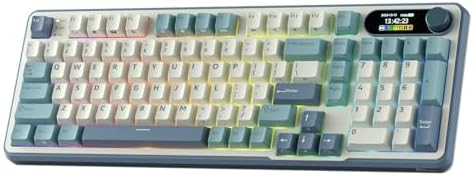
- Big Features on a Small Screen – Is there anything it can’t display? Custom gif image, date. connection mode, WIN/MAC la…
- Knob Design- Adjust volume, connection mode, backlit brightness/speed, RGB mode/color, all it takes is just a twist or a…
- BT5.0/2.4G/USB-C – Wireless keyboard with stable BT 5.0, hassle-free 2.4Ghz dongle plus USB-C wired mode set no limits a…
Comparison Table: Mechanical Keyboards for Programmers
| Product | Price | Rating | Best For | Prime |
|---|---|---|---|---|
| Keychron K6 Wireless Mechanical Keyboard | $89.99 | 4.5/5 | Wireless freedom | Yes |
| Razer Huntsman V2 Pro | $179.99 | 4.6/5 | Speed performance | Yes |
| Corsair K100 RGB | $199.99 | 4.4/5 | Customization | Yes |
| Logitech G Pro X TKL | $149.99 | 4.5/5 | Portability | Yes |
| Ducky One 3 | $129.99 | 4.7/5 | Build quality | Yes |
| Fnatic ST100 | $159.99 | 4.3/5 | Ergonomics | Yes |
| SteelSeries Apex Pro | $229.99 | 4.6/5 | Customization | Yes |
How to Choose the Best Mechanical Keyboard for Programmers
Switch Type Considerations
When selecting a mechanical keyboard for programmers, the switch type significantly impacts your typing experience. Linear switches offer smooth, consistent keystrokes without tactile feedback, ideal for rapid typing. Tactile switches provide a slight bump to confirm key presses, helping many programmers maintain accuracy without looking at the keyboard. Clicky switches offer both tactile feedback and an audible click, which some programmers find satisfying but may be distracting in shared environments. Consider your typing style and workplace noise levels when choosing switch type for your mechanical keyboard.
Layout and Size Options
The layout of your mechanical keyboard can greatly affect your programming efficiency. Full-size keyboards include all keys including the numpad, which is useful for numerical input but takes up more desk space. Tenkeyless (TKL) models remove the numpad for a more compact design, saving space while maintaining essential keys. Compact layouts like 60% or 75% further reduce size but require function layers for some keys. Consider your desk space and coding needs when choosing the layout for your mechanical keyboard, as the right size can enhance both comfort and productivity.
Programmability and Customization
Advanced programmability can significantly boost your coding efficiency when using a mechanical keyboard for programmers. Look for keyboards with dedicated macro keys that allow you to program complex shortcuts with a single keystroke. Software customization options enable remapping keys, creating custom profiles for different programming languages, and adjusting lighting effects. Some premium mechanical keyboards even offer adjustable actuation points or hot-swappable switches, allowing you to fine-tune the typing experience to your preferences. Consider how much customization you need to optimize your workflow when selecting a mechanical keyboard.
Ergonomic Features for Extended Coding
Since programmers often spend hours typing daily, ergonomic features are crucial when selecting a mechanical keyboard. Look for keyboards with adjustable height settings to maintain a neutral wrist position. Split designs can help maintain natural hand alignment, reducing strain during extended use. A comfortable wrist rest provides support during long coding sessions, and some mechanical keyboards even feature negative tilt or palm supports. Consider your comfort needs when choosing a mechanical keyboard, as proper ergonomics can prevent fatigue and long-term health issues associated with prolonged computer use.
Connectivity Options
The connectivity method of your mechanical keyboard can impact both convenience and performance. Wired connections offer the most reliable input with no latency concerns and don’t require charging. Wireless mechanical keyboards provide flexibility in positioning and reduce cable clutter, though they may introduce slight latency and require regular charging. Bluetooth connectivity allows pairing with multiple devices for seamless switching between workstations. Consider your workspace setup and mobility needs when choosing connectivity for your mechanical keyboard, as the right option can enhance both convenience and productivity.
Build Quality and Durability
Build quality is essential for a mechanical keyboard that will endure years of programming. Look for keyboards with sturdy construction materials like aluminum or high-quality plastic that can withstand daily use. Double-shot PBT keycaps resist wear and maintain texture over time, unlike cheaper ABS caps that develop shine. Mechanical switches rated for 50-100 million keystrokes ensure long-term reliability. Consider the build quality when selecting a mechanical keyboard, as a durable investment will save money and provide consistent performance throughout your programming career.
Conclusion
Choosing the right mechanical keyboard for programmers can transform your coding experience, improving both speed and comfort during long work sessions. Our top recommendations offer various features to suit different programming styles and preferences, from wireless freedom to ergonomic designs. When making your decision, consider factors like switch type, layout, programmability, and build quality to find the perfect match for your needs.
For programmers looking to enhance their entire workspace setup, consider exploring other productivity-enhancing gear like high-quality webcams or portable power banks to keep your devices charged during coding sessions. The right combination of tools can significantly improve your overall productivity and comfort as a programmer.
As an Amazon Associate, we earn from qualifying purchases.
What is the best mechanical keyboard for programmers in 2026?
The best mechanical keyboard for programmers depends on individual preferences, but top options include the Keychron K6 for wireless freedom, Razer Huntsman V2 Pro for speed, and Ducky One 3 for build quality. Each offers different features that cater to various programming needs and typing styles.
Are mechanical keyboards better for programmers than membrane keyboards?
Yes, mechanical keyboards are generally better for programmers due to their tactile feedback, durability, and customization options. They provide precise key registration, reduce typing fatigue, and often feature programmable keys that can enhance coding efficiency through custom shortcuts and macros.
What switch type is best for programming mechanical keyboards?
The best switch type depends on personal preference, but tactile switches are popular among programmers for providing feedback without noise. Linear switches offer smooth typing for rapid input, while clicky switches give both tactile and auditory feedback. Many programmers prefer tactile switches like Cherry MX Brown or similar alternatives.
Do I need programmable keys in a mechanical keyboard for programming?
Programmable keys aren’t essential but can significantly enhance productivity for programmers. They allow you to create custom shortcuts for frequently used code snippets, commands, or complex operations, reducing the need to type repetitive sequences and speeding up your workflow.
Are wireless mechanical keyboards reliable for programming?
Modern wireless mechanical keyboards are generally reliable for programming with minimal latency. Models from reputable brands like Keychron, Razer, and Logitech use advanced Bluetooth technology that provides responsive performance. However, for absolute zero latency, some programmers still prefer wired connections.
How important is ergonomics in a mechanical keyboard for programmers?
Ergonomics is crucial for programmers who spend hours typing daily. Features like adjustable height, split designs, and comfortable wrist rests can prevent strain and long-term health issues. An ergonomic mechanical keyboard setup can significantly improve comfort and productivity during extended coding sessions.