A good dash cam is cheap insurance against everything a busy road can throw at you — disputed accidents, hit-and-runs, parking-lot dings, and insurance claims that hinge on who did what. After digging through hands-on testing from Wirecutter, PCMag, and Vortex Radar, and cross-checking thousands of owner reviews, we narrowed the field to seven dash cams that actually earn their spot on your windshield. Whether you want Wirecutter’s top overall pick, a radar-parking flagship, or a sub-$60 starter cam, there’s a camera here for you.
Our Picks at a Glance
- 🥇Top Pick: VIOFO A229 Pro 4K HDR Dash Cam (Front + Rear)
- 🥈Best Premium / Parking Mode: THINKWARE U3000 4K Dash Cam
- 🥉Best 3-Channel: Vantrue N4 Pro S 4K 3-Channel Dash Cam
- ⭐Best Value 4K: ROVE R2-4K Dash Cam
- 💰Best Budget Front + Rear: REDTIGER F7N Elite 4K HDR Dash Cam (Front + Rear)
- 💵Best Compact: Garmin Dash Cam Mini 3
- 🌱Best Budget: 70mai M310 Plus 4K Dash Cam
Our Verdict: The VIOFO A229 Pro is our top pick — it’s Wirecutter’s best overall dash cam for a reason, pairing razor-sharp 4K front and 2K rear video with dual Sony STARVIS 2 sensors at a fair price. But if you park on the street overnight, the THINKWARE U3000’s radar-based parking mode is worth every extra dollar.
Why Trust ShoppingPicker
We cross-referenced hands-on testing from Wirecutter, PCMag, and Vortex Radar with real-world owner reviews on Amazon and major retailers. Every pick was then checked for current pricing across manufacturer and retailer listings, and evaluated on video quality, sensor type, channel count, parking-mode behavior, storage, and ease of installation. We only recommend cameras we’d actually mount in our own cars.
How to Choose the Right Dash Cam
Resolution: Why 4K Matters (But Isn’t Everything)
Higher resolution is really about one thing: reading license plates. A 4K camera captures far more detail than 1080p, so you’re more likely to pull a plate number from footage after an incident. But resolution alone doesn’t guarantee quality — a good sensor (Sony’s STARVIS 2 is the current gold standard) and good low-light processing matter just as much, especially at night when plates are hardest to read.
Front-Only vs. Front-and-Rear
A front-only camera covers the most common accident scenario — someone hitting you from ahead or crossing your path. A rear camera adds coverage for rear-end collisions and tailgaters, which are exactly the cases where liability gets argued. If you only buy one camera, front is fine; if you drive for rideshare or spend a lot of time on busy highways, front-and-rear is worth the small premium.
Parking Mode and Hardwiring
Parking mode keeps the camera recording (or buffering) while your car is off, so it catches hit-and-runs in the lot. Basic cameras use motion or impact detection; premium models like the THINKWARE U3000 use radar, which watches for movement with almost zero battery drain. Most parking modes require hardwiring the camera to your fuse box — an easy job for a shop, or a 30-minute DIY with a hardwire kit.
Sensors and Night Vision
The sensor is the heart of a dash cam, and it decides how much detail you keep after dark. Sony STARVIS sensors are the benchmark for low-light clarity, and STARVIS 2 is the current generation you’ll see on the best 2026 models. If you do most of your driving at night or in poor weather, prioritize a STARVIS 2 sensor over a higher resolution number.
Storage and Loop Recording
Every dash cam loops footage — when the card fills, the oldest clips are overwritten. That means your microSD card is the thing that decides how much history you keep. A 128GB card holds roughly a full day of 4K front-and-rear footage. Buy a high-endurance card rated for constant writing, and look for a camera that supports at least 256GB if you want multi-day history before clips get recycled.
Dash Cams Compared at a Glance
| Model | Best For | Resolution | Channels | Price |
|---|---|---|---|---|
| VIOFO A229 Pro | Top Pick | 4K + 2K | Front + Rear | ~$330 |
| THINKWARE U3000 | Premium Parking | 4K | Front | ~$500 |
| Vantrue N4 Pro S | Rideshare | 4K + 1080p + 2.5K | Front + Cabin + Rear | ~$330 |
| ROVE R2-4K | Value 4K | 4K | Front | ~$120 |
| REDTIGER F7N Elite | Budget Front + Rear | 4K + 1080p | Front + Rear | ~$160 |
| Garmin Mini 3 | Compact | 1080p | Front | ~$150 |
| 70mai M310 Plus | Budget | 4K | Front | ~$60 |
1. VIOFO A229 Pro 4K HDR Dash Cam (Front + Rear)

- 【4K +2K Dual STARVIS 2 Sensors Dash Cam】 The pioneering A229 Pro dash cam is equipped with dual flagship STARVIS 2 image…
- 【HDR for Front and Rear Night Vision 2.0】 The A229 Pro boasts STARVIS 2 MX678 and IMX675 sensors, expertly combined with…
- 【3 Parking Modes for 24/7 Protection】 A229 Pro is supported by a buffering function, it will initiate automatic recordin…
What We Like
- 4K front + 2K rear with dual Sony STARVIS 2 sensors (IMX678 + IMX675)
- Wirecutter’s top overall dash cam pick for sharp, detailed video
- 5GHz Wi-Fi for fast phone transfers
- Buffered 24-hour parking mode, GPS, and voice control
What Could Be Better
- No built-in screen — settings run through the app
- MicroSD card sold separately
- 3-channel version costs extra if you want a cabin cam
Flaws but not dealbreakers: It has no built-in display, so everything runs through the app, and you’ll need to supply your own microSD card. But for image quality, reliability, and a feature set that Wirecutter calls the best overall, the A229 Pro is the dash cam we’d mount first.
Best For: Best For: Drivers who want the best image quality and reliability without paying flagship-tier prices.
2. THINKWARE U3000 4K Dash Cam
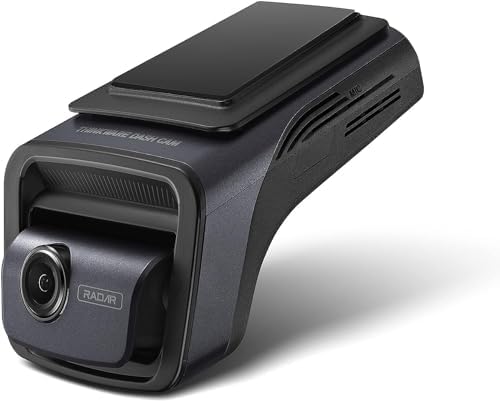
- 【EASY WI-FI DEVICE PAIRING WITH THINKWARE LINK APP & BLUETOOTH】 Built-in Bluetooth allows hassle-free dash cam pairing w…
- 【EASY ACCESS WITH THINKWARE CONNECTED APP】THINKWARE CONNECTED App provides easy access to your Thinkware Dash Cam so you…
- 【SPEED AND RED LIGHT CAMERA ALERT】The built-in GPS antenna tracks the speed and time data of your vehicle and enables th…
What We Like
- 4K Sony STARVIS 2 sensor with Super Night Vision 4.0
- Radar-based parking mode that barely touches your battery
- Dual-band 5GHz Wi-Fi, Bluetooth, and ADAS alerts
- 64GB microSD included, supports up to 512GB
What Could Be Better
- Front-only out of the box — a rear camera costs extra
- Premium price is hard to justify for casual drivers
- Bulkier mount than most compact rivals
Flaws but not dealbreakers: It’s expensive and ships front-only, so a full front-and-rear setup pushes the price even higher. But the radar parking mode is genuinely best-in-class if you park on the street overnight and want 24/7 coverage without killing your battery.
Best For: Best For: Drivers who want 24/7 radar-based parking surveillance and top-tier night vision.
3. Vantrue N4 Pro S 4K 3-Channel Dash Cam

- [Flagship 4K 3CH Dash Cam w/ Triple STARVIS 2] Vantrue’s flagship N4 Pro s Dash Camera features 4K+2.5K+1080P /30FPS 3 c…
- [Night Vision 4.0 & License Plate Recognition] Unleash superior clarity at night with 360 dash camera for cars. Powered …
- [Flexible 360° Rear Camera & Front+Rear Recording Modes ] The rear dash camera features a 2.5K STARVIS 2 sensor with 360…
What We Like
- 4K front, 1080p cabin, and 2.5K rear cameras in one unit
- Triple Sony STARVIS 2 sensors with HDR
- IR night vision for clear cabin recording after dark
- Supports up to 1TB of storage, 24/7 buffered parking mode
What Could Be Better
- Three channels of footage fills memory cards fast
- Cabin camera is overkill if you don’t rideshare
- Larger on-windshield footprint than single cameras
Flaws but not dealbreakers: Three channels means triple the storage churn, and the cabin cam is pointless if you’re the only one ever in the car. But for rideshare drivers and families who want every angle covered, nothing else in this guide records front, cabin, and rear at once.
Best For: Best For: Rideshare drivers and families who want front, cabin, and rear coverage in one camera.
4. ROVE R2-4K Dash Cam

- 4K ULTRA HD RECORDING with 8MP SONY Sensor – The ROVE R2-4K dash camera records video up to 2160P Ultra HD. MEMORY CARD …
- BUILT-IN WiFi 6 — Use the ROVE App to view and manage dash cam recordings instantly on your iPhone (iOS) or Android smar…
- DASH CAM WITH GPS – Built-in GPS accurately records your driving location and speed. You can view your driving route and…
What We Like
- True 4K UHD recording with an 8MP sensor
- Wi-Fi 6 and GPS built in
- Super Night Vision with a 150-degree wide lens
- Supports up to 512GB microSD
What Could Be Better
- Front-only — no rear camera option
- 2.4-inch screen is small for settings
- On-camera menu feels dated compared to app-first rivals
Flaws but not dealbreakers: It’s front-only and the on-camera menu feels a generation old, but you’d be hard-pressed to find another true 4K dash cam with GPS and Wi-Fi 6 for around $120.
Best For: Best For: Budget-conscious buyers who still want genuine 4K recording and GPS.
5. REDTIGER F7N Elite 4K HDR Dash Cam (Front + Rear)

- [High-Definition Dual Dash Cam] – Enhance your driving experience with REDTIGER STARVIS 2 dashcam recorder, boasting 4K(…
- [Intuitive Touch & Voice Control] – Experience effortless control with REDTIGER car camera’s advanced touchscreen and vo…
- [High-Speed WIFI Connectivity & GPS Tracking] – Revolutionize your driving experience with our state-of-the-art dashcam …
What We Like
- 4K front + 1080p rear with Sony STARVIS 2 sensor
- 128GB memory card included in the box
- 5.8GHz Wi-Fi 6 and a 3.18-inch touchscreen
- Voice control and built-in GPS
What Could Be Better
- Rear camera needs an extra cable run
- Touchscreen can be finicky in bright sunlight
- No cloud or LTE connectivity
Flaws but not dealbreakers: The rear camera requires a second cable run and the touchscreen washes out in direct sun, but for around $160 with a 128GB card included, this is the most complete budget front-and-rear package we found.
Best For: Best For: Buyers who want front-and-rear coverage on a budget, with a memory card included.
6. Garmin Dash Cam Mini 3

- Ultracompact, key-sized dash camera goes virtually unnoticed on your windshield; automatically records and saves video o…
- Easy-to-use dash camera records crisp 1080p HD video, and a wide 140-degree field of view captures details in bright and…
- Built-in Garmin Clarity polarizer lens reduces windshield glare to clearly show important video details
What We Like
- Key-sized, ultra-discreet mount that hides behind the mirror
- 1080p HD with a 140-degree field of view
- Voice control and automatic incident detection
- Backed by Garmin’s app and optional Vault cloud storage
What Could Be Better
- No screen at all — everything runs through the app
- 1080p only, no 4K option
- No built-in GPS on the Mini 3
Flaws but not dealbreakers: It tops out at 1080p, skips a screen and GPS, and leans on the Garmin app for everything. But if you want a dash cam you’ll literally forget is there, the Mini 3 disappears behind your mirror better than anything else here.
Best For: Best For: Drivers who want a discreet, set-and-forget camera from a brand they trust.
7. 70mai M310 Plus 4K Dash Cam

- 【4K Ultra HD Clarity for Every Drive】Record every moment in true 4K UHD with this dash cam front, capturing sharper deta…
- 【Enhanced Night Vision for Low-Light Driving】Drive with confidence at night using this dash cam with enhanced night visi…
- 【Smart Emergency Recording with Pre-Recording】Stay protected with advanced emergency recording on this dashcam. The buil…
What We Like
- 4K recording for well under $100
- 140-degree wide lens with night vision
- Wi-Fi app control and voice commands
- Parking mode, G-sensor, and loop recording
What Could Be Better
- Front-only, no rear camera
- Build quality feels lighter than pricier rivals
- App can be slow to transfer large 4K files
Flaws but not dealbreakers: It’s front-only with a plasticky build and slow-ish 4K file transfers, but at roughly $60 it delivers 4K footage that punches far above its price — the best starter dash cam we tested.
Best For: Best For: First-time dash cam buyers who want 4K on a shoestring budget.
Frequently Asked Questions
1. Do dash cams drain my car battery?
A properly installed dash cam draws almost no power while you’re driving, since it runs off the vehicle’s electrical system. The concern is parking mode, which keeps the camera active when the car is off. Basic parking modes shut down automatically at a set voltage cutoff to protect the battery, and radar-based systems like the THINKWARE U3000 use a fraction of the power. For the safest setup, hardwire the camera to a switched or constant fuse with a low-voltage cutoff.
2. Are dash cams legal?
Yes — dash cams are legal in the US and most countries for recording your own driving and the public road. The main restrictions are placement (many states require the camera not to obstruct your view, usually mounted behind the mirror) and audio recording, which can be subject to consent laws if you record passengers without telling them. If you drive for a rideshare service, check local rules on cabin recording and post any required notice.
3. Will a dash cam work in extreme heat or cold?
Most quality dash cams use capacitors instead of lithium batteries specifically so they can survive hot windshields and freezing winters. Capacitor-based cameras tolerate a much wider temperature range and won’t swell or fail in summer heat. If you live somewhere with extreme temperatures, look for a capacitor-powered model and a high-endurance microSD card rated for the conditions.
4. How long does a dash cam record before looping over?
It depends on resolution and card size. A 128GB card stores roughly a full day of 4K front-and-rear footage before the oldest clips are overwritten, while a 1080p front-only camera can keep several days on the same card. Dash cams always loop — they never just stop — so the real question is how much history you want available before it’s recycled. A 256GB or 512GB card stretches that window significantly.
5. Can dash cam footage be used as evidence?
Yes. Dash cam footage is routinely used in insurance claims, police reports, and court cases. The key is that the footage must be clear, timestamped, and continuous. A camera with GPS that stamps speed and location, plus a reliable high-endurance memory card, makes your footage far more useful if you ever need it. Always export and back up an important clip immediately so it doesn’t get overwritten.
6. Do I really need a rear camera too?
A rear camera isn’t mandatory, but it’s the single most valuable upgrade after the front camera. Rear-end collisions, tailgating, and lane-change disputes are exactly the situations where the front view doesn’t tell the full story. If you drive for rideshare, haul a trailer, or commute on busy highways, front-and-rear coverage is worth the small additional cost and wiring effort.
7. How hard is it to install a dash cam?
Basic installation is a 10-minute job: mount the camera behind the mirror, run the power cable to the 12V socket, and you’re recording. For a clean, wire-free look and parking-mode power, you’ll want a hardwire kit connected to the fuse box — about a 30-minute DIY project with a fuse tap, or a quick job for any car-audio shop. Rear cameras add one more cable run tucked under the headliner and trim.
Disclosure: ShoppingPicker participates in the Amazon Services LLC Associates Program. As an Amazon Associate, we earn from qualifying purchases at no additional cost to you.
Sources & Further Reading
- Wirecutter (NYT): The 2 Best Dash Cams of 2026
- PCMag: The Best Dash Cams We’ve Tested for 2026
- Vortex Radar: What’s the Best Dash Cam in 2026?