Published October 12, 2025 · Last updated September 9, 2026
This guide first ran in October 2025 and was rebuilt in September 2026 around one question: what is the cheapest set of smart devices that will still work reliably a year from now? Our answer is a six-piece starter kit – smart plugs, color bulbs, an Echo Dot, an indoor camera, a smart power strip and, once the basics run themselves, a budget thermostat. Below you will find what each budget level actually buys, the six picks we re-verified live on Amazon, the setup order that prevents rework, the security steps that cost nothing, and the failure modes that kill cheap smart homes.
Affiliate disclosure: We earn commission from qualifying purchases made through links on this page. This never affects our rankings or what we recommend.
In this guide:
- What each budget level buys
- The six-pick starter kit, verified live
- The setup order that prevents rework
- Wi-Fi, Zigbee, Thread and Matter – what the box claims mean
- How we chose these picks
- Security basics that cost nothing
- Failure modes: where cheap smart homes break
- Budget smart home FAQ
What Each Budget Level Buys in 2026
Budget smart home advice usually says start small without saying what each extra dollar buys. Here is the ladder we would climb, based on the listing data and tester results below:
- Around $30 (first two devices): a 2-pack of smart plugs plus one color bulb. You get app control, schedules and away-modes – the core convenience. No voice, no rooms, no routines yet.
- Around $120 (core four): add the Echo Dot and the Blink Mini 2. Voice control, named rooms, routines and camera announcements turn separate apps into one house. Past this point you are buying convenience, not capability.
- Around $200-250 at list (all six): add the HS300 power strip (media console control plus per-outlet energy monitoring) and the Sensi Lite thermostat – the one pick that moves a utility bill.
- Beyond $300: the stop zone. Learning thermostats, premium speakers and Matter everything buy polish, not function. A budget kit that follows the steps below does 90 percent of it.
Where paying more stops buying performance: plugs past roughly $15 each only add Matter support and energy data; bulbs past roughly $15 buy ecosystem polish, not brighter light; speakers past the Dot buy louder audio, not better automation; thermostats past the Sensi Lite buy learning algorithms and geofencing, not bigger savings. And notice what is missing from this ladder: a hub. None of the six picks needs one.
The Six-Pick Starter Kit, Verified Live
Method note, 2026-09-09: every pick was re-verified on its live Amazon listing (title, rating pool, buy box) on this date. Three listings (Echo Dot, Blink Mini 2, Wyze Bulb Color) showed a region-availability notice to our non-US visitor address – a known geo-display artifact for these brands, not an out-of-stock flag; rating pools were read from the same listings. Prices move weekly; treat all dollar figures as ranges.
| Pick | Listing rating (pool, Sep 9 2026) | Works with | Radio | Ongoing cost |
|---|---|---|---|---|
| TP-Link Kasa Smart Plug Mini HS103P2 (2-Pack) | 4.6 (150,633) | Alexa, Google Home | Wi-Fi 2.4GHz | None |
| Wyze Bulb Color (2-Pack) | 4.3 (4,307) | Alexa, Google Assistant | Wi-Fi 2.4GHz | None (Wyze account required) |
| Amazon Echo Dot (newest model) | 4.7 (199,360) | Alexa | Wi-Fi | None |
| Blink Mini 2 | 4.4 (11,760) | Alexa | Wi-Fi 2.4GHz | Optional cloud plan |
| Kasa Smart Plug Power Strip HS300 | 4.6 (9,427) | Alexa, Google Home | Wi-Fi 2.4GHz | None |
| Sensi Lite Smart Thermostat ST25 | 4.0 (2,334) | Alexa, Google Assistant | Wi-Fi | None |
Ratings and pool sizes were read from the live listings on September 9, 2026; pools drift daily, so treat them as a snapshot.
TP-Link Kasa Smart Plug Mini HS103P2 (2-Pack) – The universal first buy
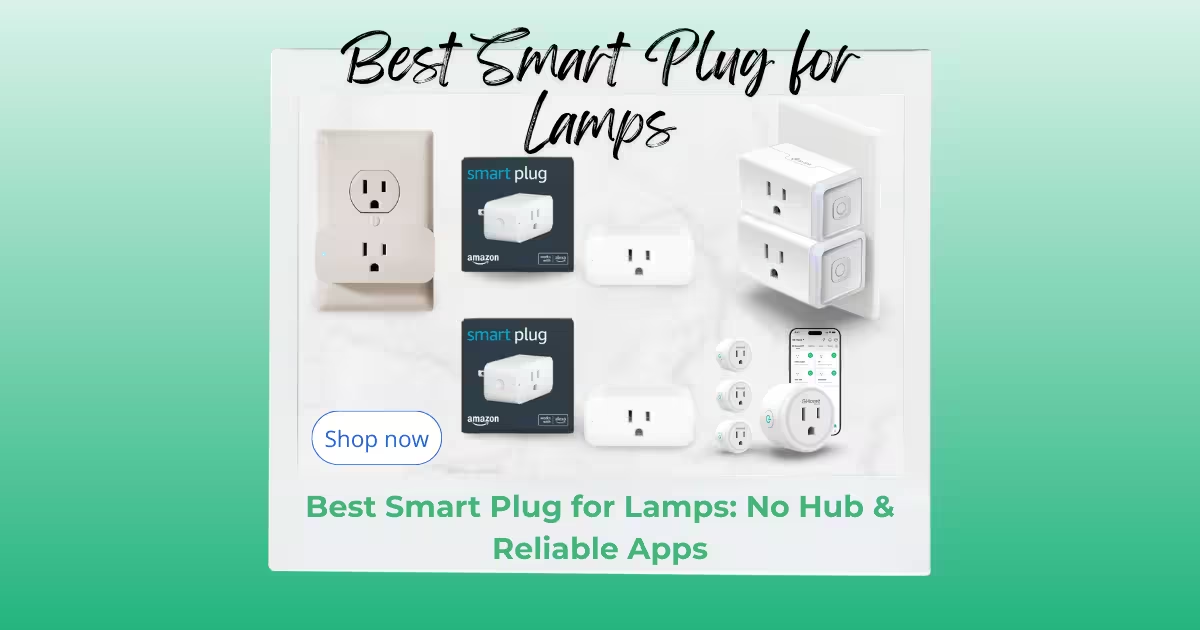
Smart plugs are the cheapest automation there is, and the HS103 two-pack is the reliable, no-drama version of that idea. Schedules, countdowns and away-modes live in the free Kasa app, there is no hub and no subscription, and the listing carries UL certification – the safety mark we like to see on anything that sits between a wall outlet and a device.
What we like:
- The cheapest reliable way to automate anything that plugs in
- UL Certified and rated 4.6 stars by more than 150,000 buyers
- Schedules and away-modes run in the free Kasa app with no hub and no subscription
Flaws but not dealbreakers:
- 2.4GHz Wi-Fi only – band steering can confuse first-time setup
- No energy monitoring – that lives on the pricier EP25 and KP125 models
Who should skip it: Skip it if you want Matter support or energy data out of the box – that is the Kasa Matter plug the testers at Reviewed crowned, at roughly twice the price.
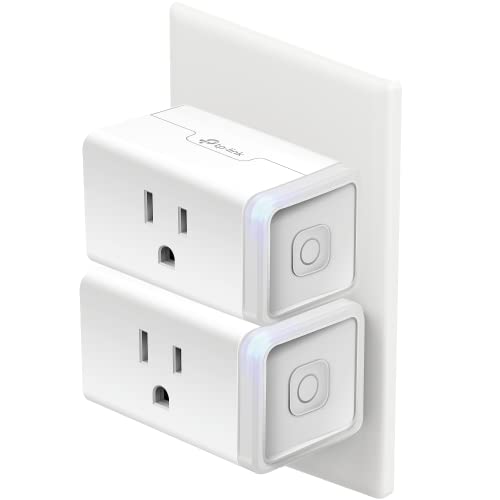
- Voice Control: Add voice control to any outlet. Enjoy the hands-free convenience of controlling any home electronic appl…
- Control From Anywhere: Turn electronics on and off from anywhere with your smartphone using the Kasa app, whether you ar…
- Scheduling: Use timer or countdown schedules set your smart plug to automatically turn on and off any home electronic ap…
Wyze Bulb Color (2-Pack) – The fastest visible upgrade
A bulb is the most satisfying first smart device because you see it work every evening. The Wyze Bulb Color pushes 1,100 lumens – brighter than most budget color bulbs – with dimming, tunable white and full color from the free Wyze app or any Alexa/Google speaker you add later. Per-bulb cost sits far below the big-name ecosystems, which is exactly what a budget kit needs.
What we like:
- 1100 lumens is brighter than most budget color bulbs
- About half the price per bulb of the big-name ecosystems
- Colors, dimming and schedules from the free Wyze app or Alexa voice
Flaws but not dealbreakers:
- Needs the Wyze account and app before it will pair
- 2.4GHz only, and Wi-Fi bulbs add to router congestion
Who should skip it: Skip it if your home is already committed to a hub ecosystem such as Hue – reusing one app beats mixing five.

- WYZE WLPA19C-2 LED SMART HOME COLORED LIGHT BULBS – TWO-PACK
Amazon Echo Dot (newest model) – The voice hub that glues the kit together
The Dot is what turns separate phone apps into one house: you say the name, the Dot relays the command, lights and plugs respond without anyone reaching for a phone. Routines chain the kit together – a single goodnight command can dim the bulbs, shut off the plugs and arm the camera. With nearly 200,000 ratings it is also the most battle-tested device in this kit.
What we like:
- The cheapest glue that turns separate apps into voice control and routines
- 4.7 stars across more than 199,000 ratings – the most-tested device in this kit
- Routines chain the whole kit – one goodnight command dims bulbs, kills plugs and arms the camera
Flaws but not dealbreakers:
- Requires an Amazon account and a cloud connection for most commands
- No Zigbee or Thread radio – Wi-Fi devices only
Who should skip it: Skip it if your household already lives in Google Home – you want a Nest speaker instead, and the rest of this kit works with it too.

- Your favorite music and content – Play music, audiobooks, and podcasts from Amazon Music, Apple Music, Spotify and other…
- Alexa is happy to help – Ask Alexa for weather updates and to set hands-free timers, get answers to your questions and e…
- Keep your home comfortable – Control compatible smart home devices with your voice and routines triggered by built-in mo…
Blink Mini 2 – Indoor security for the price of dinner
A plug-in camera answers the question every first-time buyer eventually asks: is the house actually okay right now? The Blink Mini 2 records 1080p HD with color night view, a built-in spotlight and two-way audio, and setup is genuinely minutes – power, app, live view. It is Alexa-native, so an Echo Dot can announce motion without extra bridges.
What we like:
- Plug-in setup takes minutes – power it, open the Blink app, see live view
- Color night view and a built-in spotlight for dark rooms
- Two-way audio lets you talk to pets or delivery people from the app
Flaws but not dealbreakers:
- Cloud clip storage needs a Blink subscription after the trial ends
- Local storage wants a Sync Module 2, which is extra hardware
Who should skip it: Skip it if you refuse any subscription – the Wyze Cam v4 records to a microSD card for free and costs about the same.
Prefer zero monthly fees over ecosystem polish? The Wyze Cam v4 costs about the same, records clips locally to a microSD card, and skips the subscription entirely.

- Mini 2 is our second generation plug-in smart security camera that helps you stay connected to what’s happening in your …
- See and speak from the Blink app — Experience 1080p HD live view, night view in color with a built-in spotlight, a wider…
- Outdoor use — Plug in Mini 2 outside your home with the Blink Weather Resistant Power Adapter (sold separately or as par…
Kasa Smart Plug Power Strip HS300 – When one plug is not enough
The HS300 is the kit’s multiplier: six individually controlled smart outlets plus three always-on USB ports in one surge-protected bar. The TV console is the classic use – screen, console, soundbar and charger all get their own schedule without buying six separate plugs – and per-outlet energy monitoring shows what each device really costs you.
What we like:
- Six individually controlled outlets plus three always-on USB ports
- Per-outlet energy monitoring in the free Kasa app
- Surge protection built in, rated 4.6 stars by more than 9,000 buyers
Flaws but not dealbreakers:
- Bulky footprint hogs space on a crowded media console
- 2.4GHz Wi-Fi only
Who should skip it: Skip it for a nightstand or a single lamp – a single HS103 does that job for half the price.
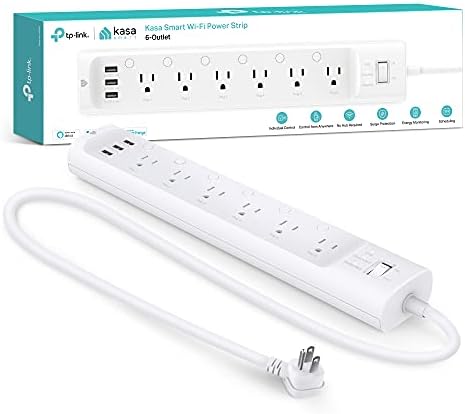
- 6 smart outlets: Independently control 6 smart outlets, and charge 3 devices with built in USB ports; Ideal for controll…
- Surge protection: ETL certified surge protection shields sensitive electronics and appliances from sudden power surges t…
- Energy monitoring : Monitor how much energy devices connected to the power strip consume; Check on each one from your Ka…
Sensi Lite Smart Thermostat ST25 – The first real upgrade after the basics
Once plugs and lights run themselves, heating and cooling is where the actual money is. The Sensi Lite is an Energy Star certified smart thermostat with 7-day, 8-period scheduling at a price well under the premium learning tier. It works with Alexa and Google Assistant, and honest schedules alone trim the biggest bill in the house.
What we like:
- Energy Star certified smart thermostat well under the premium price tier
- 7-day and 8-period scheduling trims the biggest bill in the house
- Works with Alexa and Google Assistant from the same Sensi app
Flaws but not dealbreakers:
- Requires a C-wire – homes without one need an adapter or a different model
- 4.0-star pool is small next to the rest of this kit (about 2,300 ratings)
Who should skip it: Skip it if you rent and cannot touch the wall thermostat – start with plugs and bulbs and revisit when you can.

- EASY DIY INSTALLATION: Do it yourself fast with a built-in level and simple step-by-step instructions. Works with the HV…
- COMMON WIRE REQUIREMENTS: Common wire(C-Wire) required for heat pump and heat/cool only systems. C-wire not required on …
- SAVE ABOUT 23% ON HVAC ENERGY: ENERGY STAR-certified and packed with features that help you save money, including flexib…
The Setup Order That Prevents Rework
Most budget smart home pain is self-inflicted in the first hour. This is the order we would follow, gathered from setup guides and the recurring complaints in buyer reviews:
- 1. Check the router before buying anything. Almost every budget device here is 2.4GHz Wi-Fi only. Routers that share one network name across 2.4GHz and 5GHz can leave devices flip-flopping between bands – How-To Geek documented exactly this failure and fixed it by separating the bands so smart gear could settle on the longer-range 2.4GHz band.
- 2. Secure the network before adding devices. NIST puts the router first for a reason: “Your home Wi-Fi router is a key part of your cybersecurity plan. It should have a strong password.” Consider a separate network for smart devices so a cheap gadget cannot sit next to your laptop on the same segment.
- 3. Add one plug and name it like a human. “Family Room Lamp” becomes a voice command; “Plug 1” becomes regret. Names are permanent – choose them once, properly.
- 4. Build rooms and groups before routines. Rooms make every later routine shorter. Grouping the two bulbs and the power strip as “Living Room” is two minutes now and saves hours later.
- 5. Write routines that replace steps, not gimmicks. A goodnight routine that dims bulbs, shuts the strip and arms the camera will earn its keep daily; a fart-noise routine will not.
- 6. Cameras and thermostats last. They carry the most privacy and wiring decisions. Check the privacy settings before the first clip uploads – NIST advises adjusting what is saved and what leaves the house to your comfort level – and confirm your HVAC has the C-wire the Sensi Lite needs before buying.
Wi-Fi, Zigbee, Thread and Matter – What the Box Claims Mean
Every box in this kit says “Works with Alexa and Google” and none of them needs a hub. That is because all six speak plain Wi-Fi, which is the budget move: no bridge, but also no mesh redundancy. How-To Geek’s networking guide puts the trade-off plainly – mesh protocols such as Zigbee, Thread and Z-Wave keep working when the router crashes and suit battery devices, while “Wi-Fi is a thirsty technology.” Their primer also notes Zigbee and Thread both ride the 2.4GHz band “the same as older (slow) Wi-Fi networks,” which is exactly why band congestion in step one matters.
Spec-claim reality check: “Works with Alexa” on a Wi-Fi device means the vendor’s cloud mediates the command. If that cloud ever shuts down, voice control dies with the app even though the hardware works. Matter, the standard meant to end this, is still maturing – How-To Geek calls it a cross-platform standard that “in theory, allows smart home devices to work with all major smart home systems,” with the reality messier. Our budget kit skips Matter deliberately; if it matters to you, that is what the pricier Kasa Matter plug adds.
How We Chose These Picks
Nothing on this page was lab-tested in our own facility – we are a deals-and-guides site, not a test lab. What we did: re-verified every listing live on September 9, 2026 (titles, rating pools, buy boxes), read the recurring complaints in negative reviews, and cross-checked our rankings against independent testers. Our full process is described in How We Test & Choose Products.
Where we disagree with the testers: Reviewed.com’s testers name the Kasa Matter Smart Plug with Energy Monitoring “the best smart plug we’ve tested,” praising its “slim design that doesn’t block other outlets” along with Matter support and energy insights. We agree it is the better plug – and still picked the HS103 two-pack for this kit, because a budget kit lives on price per device and the HS103 keeps the same app and reliability family at roughly half the cost. Buy their pick if Matter and monitoring matter; buy ours if the goal is the cheapest solid automation. PCMag’s test team, meanwhile, counts the Kasa HS300 power strip among its top-tested picks, which matches the pick we made here.
Security Basics That Cost Nothing
Cheap does not have to mean insecure, and none of the basics below costs a dollar. NIST’s smart-home security researcher keeps the list short: “You can take simple steps to make your smart home safer, such as never reusing your password and setting up two-factor authentication.” Their team also found many people did not know whether their devices were updating at all – set updates to automatic, and “if your device is older and can no longer receive updates, you should consider replacing or retiring that item.”
CISA’s guidance for securing internet-connected things says the same thing from the government side: change default usernames and passwords, keep software current, and apply patches as soon as they ship. For a budget kit that adds up to five free habits – unique passwords, two-factor authentication on the Amazon, Kasa and Wyze accounts, automatic firmware updates, a separate guest or IoT network, and privacy settings tuned before the first camera clip uploads.
Failure Modes: Where Cheap Smart Homes Break
Every pick above has a predictable failure pattern. None is a reason to skip the kit; all are reasons to set it up in the order above.
- Band flip-flopping (plugs, bulbs, camera): the single most common budget setup failure – devices that pair fine and then drop when the router steers them between bands. Fix: separate the 2.4GHz and 5GHz names as in step one.
- Cloud and account dependency (all six): a vendor retiring its cloud can retire the features you bought. NIST’s advice – retire devices that no longer receive updates – is the honest end of every budget gadget’s life.
- Subscription creep (Blink Mini 2): the trial ends and clip history goes behind a plan. If that annoys you, the microSD-recording Wyze Cam v4 in the camera section is the escape hatch.
- App sprawl (the kit as a whole): four brands means four apps and accounts. All-Kasa collapses it to one app at the cost of flexibility; the Echo Dot hides most of it behind voice once routines exist.
- Wiring surprises (Sensi Lite): no C-wire, no thermostat – the listing says so and one-star reviews confirm it. Check the HVAC wiring before ordering, not after.
Budget Smart Home FAQ
Do I need a hub for a budget smart home? No. All six picks here are Wi-Fi devices that pair straight to their apps and to Alexa or Google. You add a hub only when you adopt battery sensors or want mesh redundancy.
What should I buy first? One 2-pack of plugs and one bulb, about $30 total. It is the cheapest way to learn what your household actually wants automated before spending more.
Is a cheap smart home secure? It is as secure as the habits around it. Unique passwords, two-factor authentication, automatic updates and a separate network – the NIST and CISA checklist above – close the gaps that make headlines.
How much should I spend in total? Our ladder: about $30 to try it, about $120 for the core four, and $200-250 at list for all six. Past that you are buying polish, not function.
Once the kit is running, the fun part is deciding what deserves the next upgrade. Our 10 best smart home gadgets on Amazon covers the mid-tier and premium devices worth growing into, and the Home Essentials Guide maps the rest of the house – kitchen, sleep and lighting upgrades included.