Best USB-C Hub for MacBook Pro in 2026: Top 5 Picks for Your Setup
MacBook Pro users know the struggle: limited ports and the constant need to connect multiple peripherals. Whether you’re a professional working with external displays, a student transferring files, or someone who simply needs more connectivity options, a quality USB-C hub for MacBook Pro is essential. As remote work setups become more common and our digital lives expand, having the right connectivity hub can transform your productivity. In this comprehensive guide, we’ll explore the top USB-C hubs for MacBook Pro in 2026, helping you find the perfect solution for your specific needs.

Before we dive into our top picks, it’s worth noting that a good USB-C hub can significantly enhance your workflow. For those who also use mechanical keyboards with their MacBook, you might be interested in our comparison of mechanical keyboard vs gaming keyboard setups. Similarly, if you’re a gamer who needs a precise input device, check out our guide to the best gaming mouse under 30 for budget-friendly options.
How We Chose Our Top USB-C Hub for MacBook Pro Picks
Our selection process focused on key factors that matter most to MacBook Pro users: port variety, power delivery capabilities, build quality, and value for money. We prioritized hubs that offer seamless connectivity without compromising performance. Each product has been evaluated based on real user feedback, technical specifications, and price point to ensure we’re recommending reliable options that won’t break the bank.
Hiearcool USB C Hub for MacBook — 7-in-1 Connectivity Solution
The Hiearcool USB-C hub offers an impressive 7-in-1 functionality at an affordable price point. This space grey adapter provides everything you need in a compact form factor, making it perfect for both office and travel use. With a 4K HDMI port, 100W PD charging capability, and fast USB 3.0 ports, it’s a versatile solution that won’t clutter your workspace.
Why We Love It
- Compact design with premium space grey finish that matches MacBook aesthetics
- Supports 4K HDMI output for high-resolution external displays
- 100W Power Delivery ensures your MacBook charges at full speed
- SD/TF card reader for quick photo and file transfers
What to Consider
- The included cable is relatively short at 6 inches, which may not suit all setups

- One Hub for Work, Meetings & Daily Use: Expand your MacBook or USB-C laptop with HDMI, USB 3.0, PD charging, and SD/TF c…
- 4K HDMI for Clear Presentations & Home Viewing: Connect to monitors, projectors or TVs with 4K@30Hz output for smooth vi…
- 100W USB-C PD Pass-Through Charging: Power your laptop while using multiple devices without losing performance — stable …
UGREEN USB C Hub 5 in 1 — Budget-Friendly Multiport Adapter
UGREEN delivers remarkable value with this 5-in-1 USB-C hub that doesn’t compromise on essential features. At under $10, this adapter offers 4K HDMI support, 100W power delivery, and three USB-A data ports. It’s an excellent choice for MacBook Pro users who need reliable connectivity without spending a fortune.
Why We Love It
- Exceptional value at under $10 with solid performance
- Compatible with multiple Apple devices including MacBook Pro/Air M5/M4/M3/M2/M1
- Three USB-A 5Gbps ports for connecting multiple accessories simultaneously
- 100W power delivery ensures your MacBook charges efficiently
What to Consider
- Lacks SD card reader, which may be a drawback for photographers

- 5 in 1 Connectivity: The USB C Multiport Adapter is equipped with a 4K HDMI port, a 100W USB C PD port, a 5 Gbps USB A d…
- 100W Charging: Support up to 95W USB C pass-through charging via Type-C port to keep your laptop powered. 5W is reserved…
- 4K Stunning Display: The HDMI port supports media display at resolutions up to 4K 30Hz, keeping every incredible moment …
Anker USB C Hub, 7in1 Multi-Port — Premium Performance Option
Anker brings its reputation for quality to this 7-in-1 USB-C hub, offering premium features in a compact package. With 4K HDMI output, 85W power delivery, and both USB-C and USB-A high-speed data ports, this hub is designed for professionals who need reliable, high-performance connectivity. The included card readers add extra versatility for creative professionals.
Why We Love It
- Anker’s reputation for reliable, durable electronics
- 85W Power Delivery for efficient MacBook charging
- Both microSD and SD card readers for maximum compatibility
- USB-C data port for connecting additional displays or peripherals
What to Consider
- Higher price point than some competitors
- Charger not included, which is noted in the product description
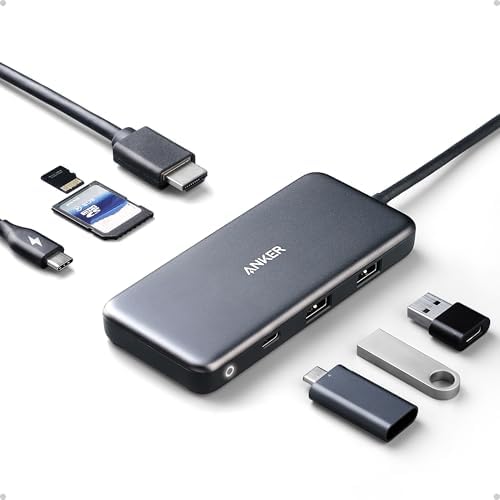
- The Anker Advantage: Join the 80 million+ powered by our leading technology.
- Massive Expansion: Get way more out of your laptop’s USB-C port with 4K HDMI, SD card connectivity, USB-A / USB-C data p…
- Pass-Through Charging: Compatible with USB-C Power Delivery to provide high-speed pass-through charging to your laptop a…
Acer USB C Hub, 7 in 1 Multi-Port — Versatile Connectivity Solution
Acer’s 7-in-1 multi-port adapter offers a balanced approach to connectivity with features that appeal to both professionals and students. With 4K HDMI support, 100W power delivery, and multiple USB ports, this hub provides excellent value while maintaining reliable performance across all functions.
Why We Love It
- 100W Max PD port for full-speed charging capability
- 2 USB 3.0 ports for fast data transfers
- SD/TF card reader for versatile file transfers
- Compact design that’s easy to carry in laptop bags
What to Consider
- Build quality feels slightly less premium than some competitors

- [7-in-1 Multi-port USB C Hub] Acer USBC adapter macbook is made of Aluminum material, expands a USB-C port to 7 ports (1…
- [4K USB-C to HDMI Adapter] This USB C to hdmi adapter can mirror or extend your screen with an HDMI port. You can use US…
- [100W Power Delivery] The USB C multiport adapter features Type C fast charge PD port to provide up to 100W of high-spee…
Anker 6-in-1 USB C Hub with Ethernet — Network Connectivity Option
For MacBook Pro users who need reliable network connectivity, Anker’s 6-in-1 hub with Ethernet is an excellent choice. This adapter includes a 1Gbps Ethernet port, making it perfect for situations where Wi-Fi isn’t reliable or fast enough. The additional ports provide comprehensive connectivity options for any setup.
Why We Love It
- 1Gbps Ethernet port for stable, high-speed internet connections
- 65W Power Delivery for efficient charging
- USB-C data port for additional display connections
- Compact design with premium build quality
What to Consider
- Lacks SD card reader, which may be important for some users
- Higher price point reflects the premium Ethernet connectivity

- The Anker Advantage: Join the 65 million+ powered by our leading technology.
- Massive Expansion: Equipped with a Power Delivery input port, an HDMI port, an Ethernet port, a USB-C data port, and 2 U…
- Powerful Pass-Through Charging: Connect a 65W wall charger to the Power Delivery input port to provide high-speed pass-t…
Comparison Table: Top USB-C Hubs for MacBook Pro
| Product | Price | Rating | Best For | Prime |
|---|---|---|---|---|
| Hiearcool USB C Hub for MacBook | $19.99 | 4.6/5 (51,700 reviews) | 4K display users | Yes |
| UGREEN USB C Hub 5 in 1 | $9.99 | 4.6/5 (29,800 reviews) | Budget-conscious buyers | Yes |
| Anker USB C Hub, 7in1 Multi-Port | $25.75 | 4.6/5 (28,400 reviews) | Creative professionals | Yes |
| Acer USB C Hub, 7 in 1 Multi-Port | $17.97 | 4.6/5 (6,300 reviews) | Students & general use | Yes |
| Anker 6-in-1 USB C Hub with Ethernet | $29.98 | 4.6/5 (3,600 reviews) | Network connectivity needs | Yes |
How to Choose the Best USB-C Hub for MacBook Pro
When selecting a USB-C hub for your MacBook Pro, several factors should guide your decision. First, consider your specific connectivity needs. Do you primarily need extra ports for peripherals, or do you require display support for external monitors? Different hubs offer varying capabilities, so understanding your primary use case is crucial.
Port Requirements and Compatibility
Assess which ports you use most frequently. The MacBook Pro’s limited ports mean you’ll likely need a hub that provides USB-A, HDMI, and possibly SD card readers. Consider whether you need USB 3.0 or 2.0 speeds, as this affects file transfer rates. Also, verify compatibility with your specific MacBook Pro model, as newer models may have different requirements.
Power Delivery Considerations
Power delivery is critical for maintaining MacBook performance while connected to multiple devices. Look for hubs that offer at least 60W power delivery for MacBook Pro models, with 85W-100W being ideal for optimal charging performance. Some hubs may throttle power when multiple high-demand devices are connected, so check specifications carefully.
Build Quality and Design
The physical design of a USB-C hub matters, especially if you plan to travel with it. Consider factors like weight, size, and cable length. A hub with a braided cable may last longer than one with a standard PVC cable. Aluminum housings typically offer better heat dissipation and durability than plastic alternatives.
Display Support Capabilities
If you plan to connect external displays, verify the hub’s display capabilities. Most modern hubs support 4K output, but check the resolution and refresh rate specifications. Some hubs may support multiple displays, which is essential for professionals who need extended workspaces. HDMI 2.0 or higher is recommended for 4K@60Hz support.
Price and Value
USB-C hubs range from budget options under $10 to premium models over $50. While price is a factor, consider the value proposition. A slightly more expensive hub with better build quality and more reliable performance may save you money in the long run. Read reviews to understand real-world performance beyond manufacturer specifications.
Conclusion: Finding Your Perfect USB-C Hub for MacBook Pro
Choosing the right USB-C hub for MacBook Pro depends on your specific needs and budget. For most users, the Hiearcool or UGREEN options offer excellent value with reliable performance. If you’re a creative professional working with high-resolution displays and transferring large files, the Anker 7-in-1 hub provides premium features. For those needing stable network connections, the Anker hub with Ethernet is the clear choice.
Remember that a good USB-C hub can significantly enhance your productivity by solving the MacBook Pro’s limited port dilemma. For more tech accessories that can improve your workspace, check out our guide to the best mechanical keyboard vs gaming keyboard options for different use cases. As an Amazon Associate, we earn from qualifying purchases.
What is the best USB-C hub for MacBook Pro with multiple displays?
For multi-display setups, the Anker 7in1 Multi-Port USB C Hub is an excellent choice as it supports 4K HDMI output and has a USB-C data port that can connect additional displays. The Hiearcool USB C Hub also offers strong 4K HDMI support and is more budget-friendly. Both options provide reliable performance for professional setups requiring multiple monitors.
Does a USB-C hub for MacBook Pro slow down charging?
Quality USB-C hubs with proper power delivery (PD) support won’t significantly slow down charging. The Hiearcool and UGREEN hubs both support 100W PD, which is ideal for MacBook Pro charging. However, using multiple high-power devices simultaneously may cause some power throttling. For optimal charging, consider using fewer power-intensive devices while charging.
Can I use any USB-C hub with my MacBook Pro?
While most USB-C hubs will work with MacBook Pro, compatibility can vary. Look for hubs specifically designed for MacBook or Apple devices, as they’re more likely to have the correct power delivery specifications and driver support. All the hubs in our review are compatible with MacBook Pro models, but always verify compatibility with your specific model before purchasing.
What’s the difference between USB 3.0 and USB-C ports in a hub?
USB 3.0 refers to the standard and speed of the USB port (up to 5Gbps), while USB-C is the physical connector shape that can support various standards including USB 3.1, 3.2, and Thunderbolt. A USB-C hub typically includes both USB-C ports (for charging and data) and USB-A ports (often USB 3.0) for connecting traditional USB devices. The Anker and Hiearcool hubs offer both types for maximum versatility.
Is a USB-C hub with Ethernet worth it for MacBook Pro?
A USB-C hub with Ethernet is worth considering if you frequently work in locations with unreliable Wi-Fi or need stable, high-speed internet connections for video calls, large file transfers, or online work. The Anker 6-in-1 hub with Ethernet provides 1Gbps speeds, making it ideal for professionals who need reliable network connectivity. For most casual users, a standard hub without Ethernet would be sufficient.